What a platform should provide
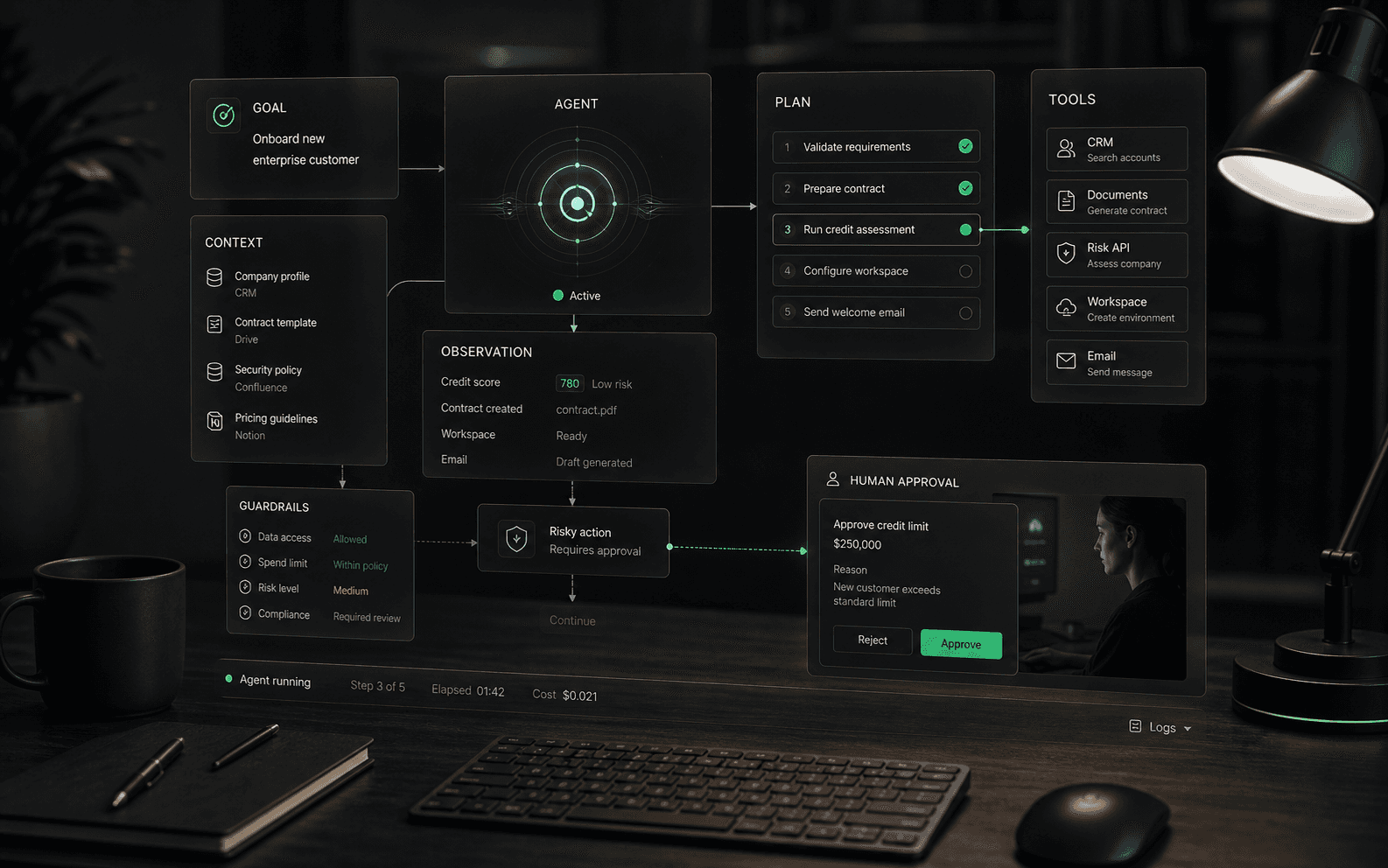
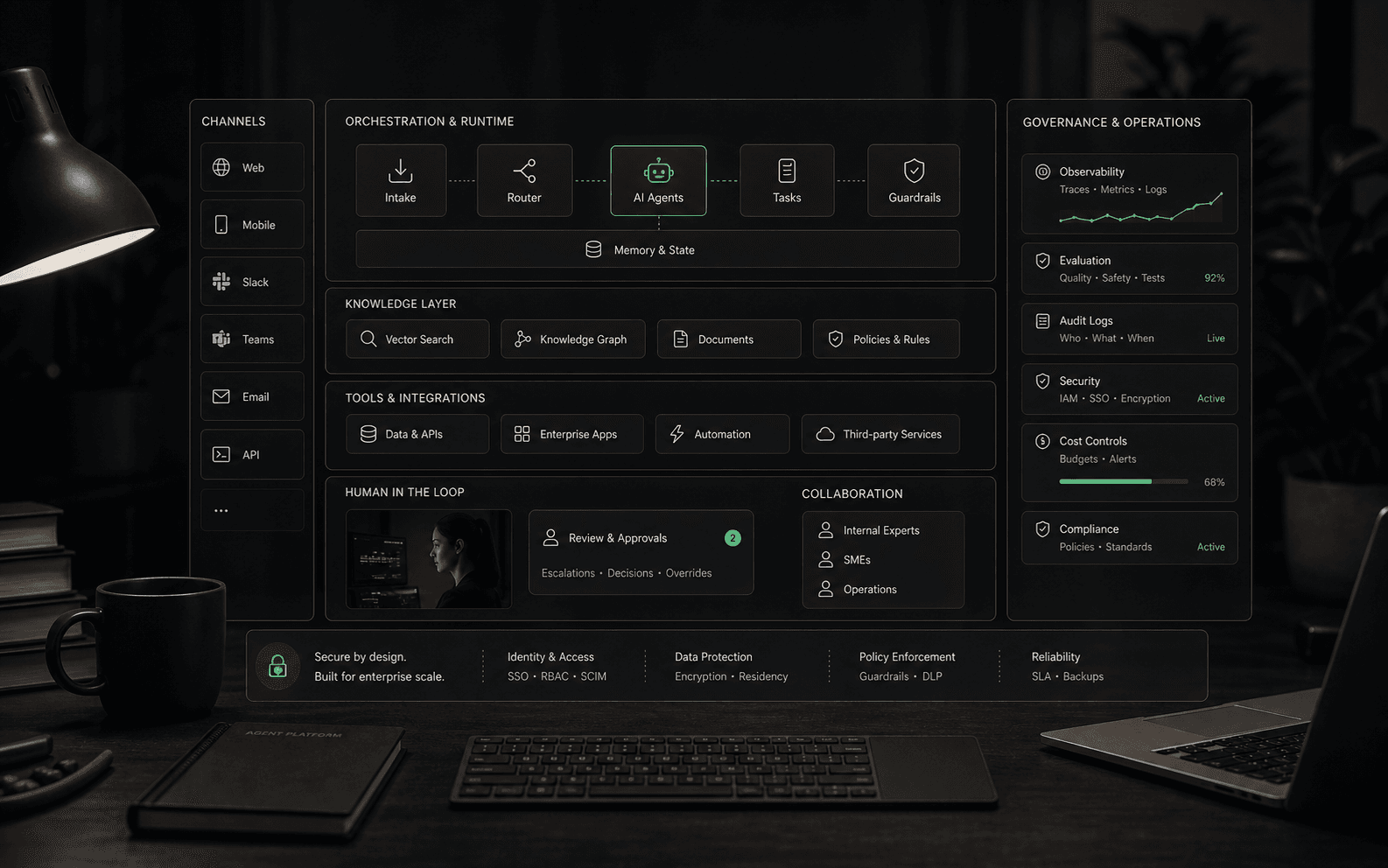
A real AI agent platform is more than a model wrapper or a chat widget. It should give teams a controlled operating layer for knowledge sources, channels, integrations, workflow rules, permissions, testing, analytics, human handoff, and continuous improvement. The platform is where the business decides what agents know, what they can do, where they appear, and how humans supervise them.
How the platform layer works
- Design layer: teams define agent goals, instructions, allowed tools, workflow steps, escalation rules, and test cases.
- Knowledge layer: the platform connects approved sources, manages updates, and gives teams a way to identify stale or missing information.
- Execution layer: the agent runs conversations or workflows, calls tools, manages state, and handles retries or failures.
- Control layer: roles, permissions, approval gates, audit logs, environment separation, and policy rules keep automation bounded.
- Measurement layer: analytics show quality, unresolved topics, handoffs, tool failures, costs, and outcomes by workflow or channel.
When a platform is worth evaluating
- You need agents across more than one channel, such as website chat, email, WhatsApp, helpdesk, ecommerce, or internal tools.
- The agent must use business-specific knowledge instead of only answering broad questions.
- The workflow includes actions such as routing, tagging, drafting, updating records, collecting missing details, or triggering approved steps.
- Managers need reporting on answer quality, deflection, escalations, unresolved topics, and workflow failures.
- Security, permissions, and human review matter because the agent touches customer data, orders, billing, accounts, or operational systems.
Build versus buy questions
Teams can build agent workflows directly on model APIs and orchestration frameworks, but they still need the operational pieces a platform normally provides: identity, permissions, connectors, evaluation, logging, rollback, human review, analytics, and support workflows. Buying a platform may reduce implementation burden, while building may offer deeper control. The practical question is which side your team is better equipped to own for the next two years, not which path sounds more flexible in a demo.
Core capabilities to inspect
- Knowledge management: source ingestion, refresh frequency, conflict handling, permissions, and content review.
- Agent design: prompt controls, workflow steps, fallback behavior, testing tools, and environment separation.
- Integrations: whether connections are read-only, write-capable, event-driven, or limited to simple handoff.
- Channel deployment: where the agent can appear and whether behavior can vary by channel or customer segment.
- Human control: approval gates, escalation routing, reviewer permissions, and audit trails.
- Analytics: unresolved questions, source gaps, action failures, containment quality, and human takeover patterns.
Governance requirements
- Role-based access: different people should have different rights to edit agents, approve workflows, view transcripts, manage sources, and configure integrations.
- Version history: teams need to know which prompt, workflow, source set, or integration version produced a given answer or action.
- Environment separation: testing, staging, and production should not blur together when agents can touch customer-facing workflows.
- Approval controls: sensitive actions should support review gates instead of relying only on written policy.
- Audit trails: the platform should record what the agent saw, what it retrieved, what it attempted, what a human changed, and what happened next.
Implementation questions
- Who owns the knowledge base after launch, and how are stale or conflicting answers fixed?
- Can teams test agents against real edge cases before public deployment?
- How are sensitive workflows restricted, approved, or escalated?
- What happens when the agent cannot answer, cannot complete an action, or receives hostile or ambiguous input?
- Can reporting distinguish between a resolved issue, a deflected issue, a bad answer, and a handoff that still required human cleanup?
Platform evaluation tests
- Run the same real workflow across two channels and verify whether the platform preserves behavior, reporting, and handoff context.
- Change a knowledge source and confirm how quickly the live agent reflects the update after review.
- Create a low-confidence or conflicting-source scenario and inspect escalation, logs, and analytics.
- Ask for a rollback demonstration after a bad workflow change.
- Test an integration failure and confirm whether duplicate actions, partial updates, and retries are visible to operators.
What is not a platform
- A standalone model API is not a platform by itself. It may generate text, but the buyer still needs workflow configuration, permissions, deployment surfaces, monitoring, and human review.
- A website chat widget is not necessarily a platform. It may become part of one, but buyers should verify whether it can support multiple workflows, roles, sources, channels, and operational reporting.
- A collection of integrations is not enough. The platform should define how agents use those integrations safely, how failures are handled, and how humans audit attempted actions.
- A dashboard with conversation counts is not governance. Mature operations need version history, approval controls, review queues, and enough evidence to understand why the agent behaved as it did.
Pricing and operating model
Platform pricing can be hard to compare because vendors may charge by seat, conversation, resolution, message volume, usage, channel, integration, or add-on capability. Buyers should model cost against expected volume and operating reality: who configures the agent, who reviews conversations, how often knowledge changes, and which workflows require human approval.
Metrics a platform should expose
A useful platform should make it possible to inspect quality and economics by agent, workflow, channel, source, team, and version. Look for resolved workflow rate, reviewed answer accuracy, escalation accuracy, handoff cleanup rate, integration failure rate, average tool calls per workflow, cost per successful outcome, latency, unresolved-topic clusters, and changes in performance after a source or workflow update.
Red flags in platform demos
Be skeptical of demos that show only perfect knowledge, only one channel, or only a simple website assistant while claiming broad workflow automation. Other warning signs include shallow reporting, unclear handoff behavior, no permission model, no testing environment, no source visibility, and integrations that sound deep but only pass a transcript to another system.
Related concepts
The platform decision connects several layers: AI agents define the work unit, RAG shapes how business knowledge is retrieved, human-in-the-loop controls define review boundaries, and evaluation methodology defines whether the rollout is improving business outcomes. Treat the platform as operating infrastructure, not as a prettier interface for a model.
Rollout maturity
A mature platform rollout usually starts narrow and becomes broader only after the team proves quality, cost, and control. A practical first phase might use read-only context, limited channels, explicit human fallback, and weekly QA. Later phases can add write actions, more channels, segmented permissions, deeper analytics, and workflow-specific optimization. Buyers should prefer vendors that can support this staged path over vendors that push immediate broad automation.
Ownership after launch
The hardest platform questions often appear after procurement. Support operations may own conversation quality, IT may own integrations and access, product teams may own source content, and leadership may own risk appetite. Buyers should clarify ownership before launch: who approves agent changes, who reviews failures, who can pause automation, who handles integration outages, and who decides when a workflow is mature enough to expand. That operating map matters as much as the feature list.
Sources to verify
Use these references to understand the term and pressure-test vendor claims. Product-specific details still need to be verified against current vendor materials.
FAQ
Common questions
Who needs an AI agent platform?
Teams that want to manage AI agents across multiple workflows, channels, or departments usually need a platform. A narrow chatbot tool may be enough for simple website Q&A.
What should buyers verify before choosing a platform?
Verify supported channels, knowledge sources, integrations, human handoff, analytics, permissions, implementation effort, and current pricing directly with the vendor.
Is a single chatbot tool enough?
It can be enough for narrow website Q&A or lead capture. A platform becomes more relevant when the work spans channels, systems, permissions, reporting, and human review.
How is an AI agent platform different from an LLM API?
An LLM API gives a team access to a model. An AI agent platform should add the operating layer around that model: workflow configuration, knowledge management, tool connections, channel deployment, permissions, evaluation, human review, analytics, and audit trails. Teams can build those pieces themselves, but they still need them for production workflows.
What is the difference between an AI agent platform and workflow automation?
Traditional workflow automation usually follows deterministic rules: if this event happens, do that action. An AI agent platform may include workflow automation, but it also needs context interpretation, knowledge retrieval, tool use, fallback behavior, and review controls for cases that are not perfectly scripted. Buyers should verify whether the platform handles ambiguity or only routes predefined cases.
Should a company build or buy an AI agent platform?
Build when the team has strong engineering capacity, deep integration needs, and a clear plan for permissions, evaluation, monitoring, and support. Buy when speed, managed connectors, admin controls, and operational tooling matter more than custom architecture. In both cases, the real cost includes knowledge maintenance, human review, testing, analytics, and ongoing workflow ownership.
What capabilities should an AI agent platform include?
A serious platform should support agent design, approved knowledge sources, tool and system integrations, channel deployment, role-based access, testing environments, approval gates, audit logs, reporting, and improvement workflows. Not every buyer needs every capability on day one, but missing governance and observability become painful as agents move into higher-risk work.
How should buyers compare AI agent platform pricing?
Compare the cost of the operating model, not only the entry plan. Model expected conversations, message volume, tool calls, human review time, premium channels, seats, add-ons, analytics needs, and implementation work. Pricing can look low in a simple demo but change materially when real workflow volume and review requirements are included.
What is a red flag in an AI agent platform demo?
A red flag is a demo that shows a perfect answer but hides source retrieval, permissions, failure handling, audit logs, rollback, or human handoff. Another warning sign is an integration list that sounds deep but only passes transcripts or webhooks without clear controls around what the agent can read or change.