AI Coding Agent Hooks: Cursor vs Claude Code vs GitHub Copilot
How lifecycle hooks, matchers, and customization surfaces separate real coding agent platforms. A buyer guide to Cursor hooks.json, Claude Code hooks, and GitHub Copilot custom instructions and preview hooks.
Hooks are the governance layer between intent and execution
What "hooks" actually means for coding agents
The word is overloaded. In this article, a hook is a programmable point where a coding agent's default behavior can be inspected, blocked, redirected, or augmented. Hooks answer three questions:
Can the agent run this command or edit this file? (permission gates)
What context must the agent load before it decides? (pre-action context)
What must happen after the agent finishes a step? (post-action enforcement)
Without hooks, a coding agent is just a chatbot with file access. With hooks, it becomes a governed teammate that can operate inside your repo safely enough to leave running while you grab coffee. That distinction matters because the same model that writes beautiful code can also delete a database, commit secrets, or drift across microservices until the fix costs more than the original task. The OWASP LLM Top 10 maps these risks—prompt injection, insecure output handling, and excessive agency—to the controls hooks provide.
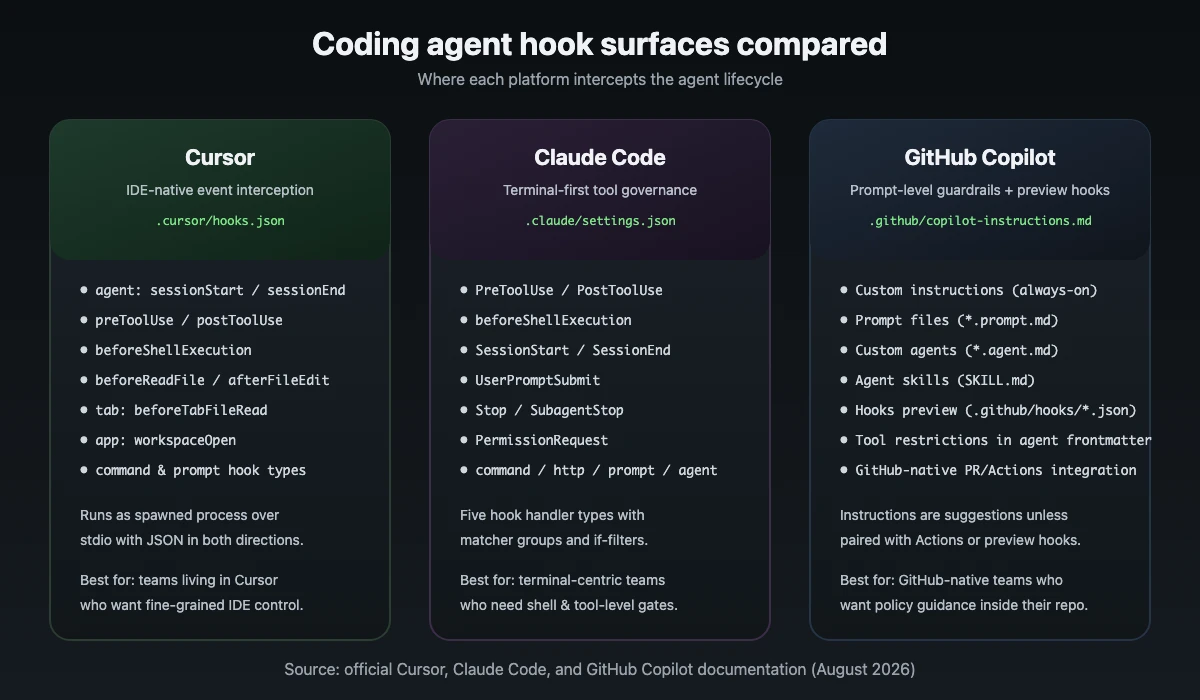
Source: official Cursor, Claude Code, and GitHub Copilot documentation
Why hooks matter more than model choice
Most engineering leaders spend their evaluation time comparing Claude 4 Sonnet, GPT-4.1, o3, Gemini 2.5 Pro, or whatever shipped last Tuesday. Model quality affects output, but execution control determines whether that output ever reaches production safely. Two teams using the same model can have wildly different risk profiles because one configured hooks and the other did not.
The real buying criteria are:
Event coverage: which agent lifecycle events can be intercepted?
Match precision: can you target hooks by file path, command pattern, tool name, or intent?
Failure mode: does a hook block the action, warn the user, or silently log?
Portability: are hooks stored in the repo, in user config, or locked to the vendor's cloud?
Observabilidad: can you audit what the agent tried, what hooks fired, and why something was allowed?
If a vendor cannot answer those five questions, you are buying autocomplete with ambition, not an agent platform.
Cursor hooks.json lifecycle hooks
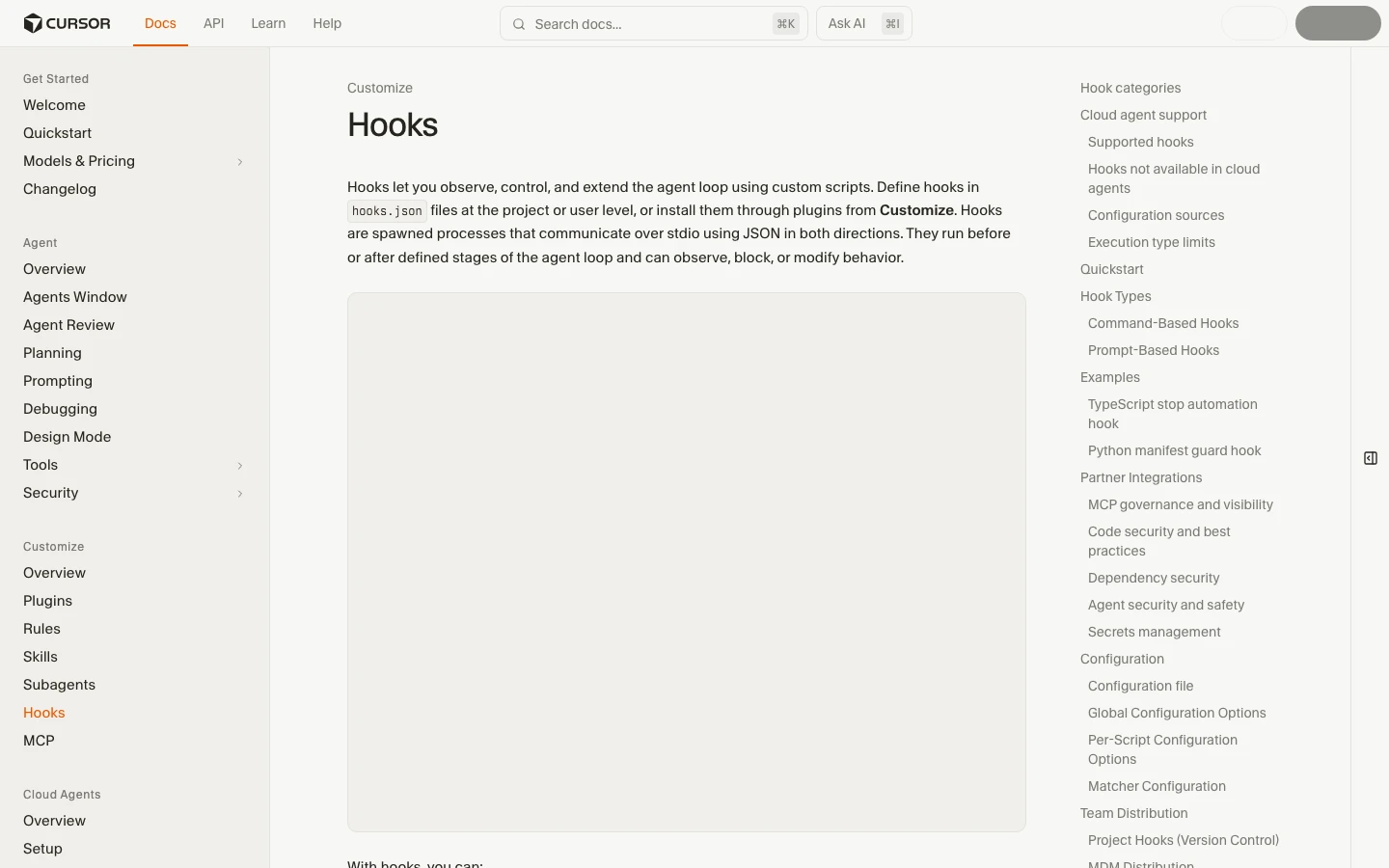
Cursor's hook system is the most IDE-native of the three. According to the Cursor Hooks documentation, hooks are defined in hooks.json files at the project level (.cursor/hooks.json) or user level (~/.cursor/hooks.json), and they run as spawned processes that communicate over stdio using JSON. They fire before or after defined stages of the agent loop and can observe, block, or modify behavior.
Screenshot: Cursor Hooks documentation page, captured August 2026
What Cursor hooks look like in practice
The Cursor docs group hooks into three categories:
Agent hooks for Cmd+K/Agent Chat: sessionStart, sessionEnd, preToolUse, postToolUse, beforeShellExecution, afterShellExecution, beforeReadFile, afterFileEdit, beforeSubmitPrompt, stop, and others.
Tab hooks for inline completions: beforeTabFileRead, afterTabFileEdit.
App lifecycle hooks: workspaceOpen fires when a workspace opens.
A minimal project-level hooks.json can block destructive shell commands and audit every tool call:
Because Cursor owns the editor surface, hooks can also inspect UI-level events: tab switches, file opens, or context panel changes. That lets you enforce rules like "any edit to payments/ must load PAYMENTS_README.md y SECURITY_REVIEW.md." Cloud agents also pick up project hooks from .cursor/hooks.json, although some events such as sessionStart y workspaceOpen do not fire in the cloud environment.
Cursor hook strengths
Deep integration with the editor's own event model, including Tab completions and workspace open events.
Repo-level config means hooks travel with the code and can be reviewed in PRs.
Can gate both agent actions and surrounding IDE context.
Cursor hook watch-outs
Syntax, schema, and available events change as Cursor ships rapidly.
Hook failures can be subtle: a misconfigured rule may silently skip a safety check.
Cross-repo consistency depends on copying or templating hooks.json across projects.
Claude Code lifecycle hooks and matchers
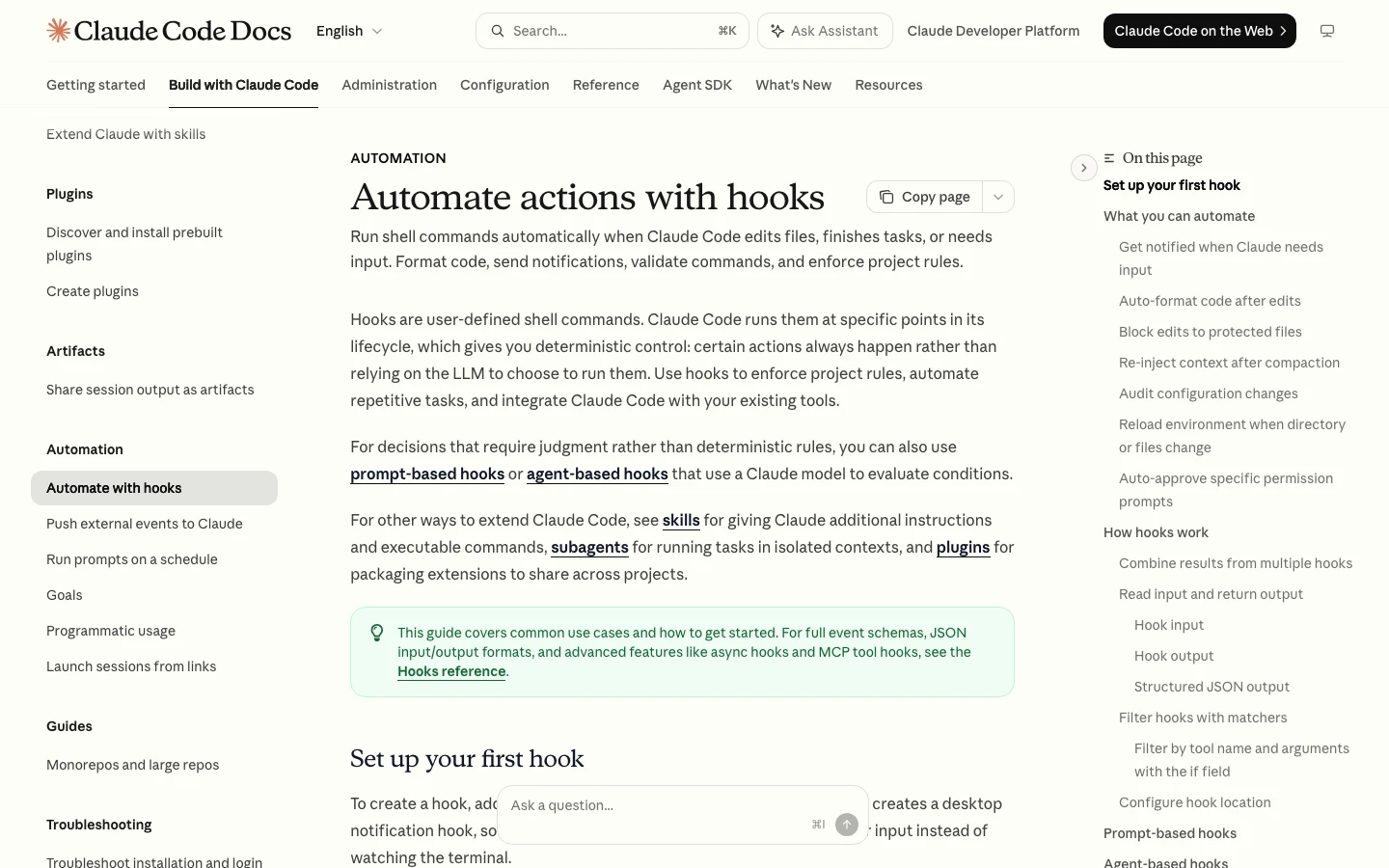
Claude Code's hook approach is built for the terminal. The Claude Code hooks guide explains that hooks are user-defined shell commands (or HTTP endpoints, MCP tool calls, prompts, or agent-based verifiers) that run at specific points in the session lifecycle. The full hooks reference documents the JSON input/output schemas and every supported event.
Screenshot: Claude Code hooks guide, captured August 2026
What Claude Code hooks do
PreToolUse fires before a tool is invoked and can inspect the tool name and arguments. It is the right place to block file writes outside allowed directories or require a confirmation before an edit touches generated code. PostToolUse lets you verify results: did the test pass, did the diff actually apply, does the file still lint? beforeShellExecution is the critical safety gate for any command that hits the shell, which is where most production incidents start. SessionStart is useful for loading required context, pinning model behavior, or printing a safety reminder.
The reference documents many more events, including UserPromptSubmit, PermissionRequest, ConfigChange, CwdChanged, FileChanged, SubagentStart, SubagentStop, PreCompact, PostCompact, y SessionEnd.
A project-level .claude/settings.json can block edits to protected files and auto-format after writes:
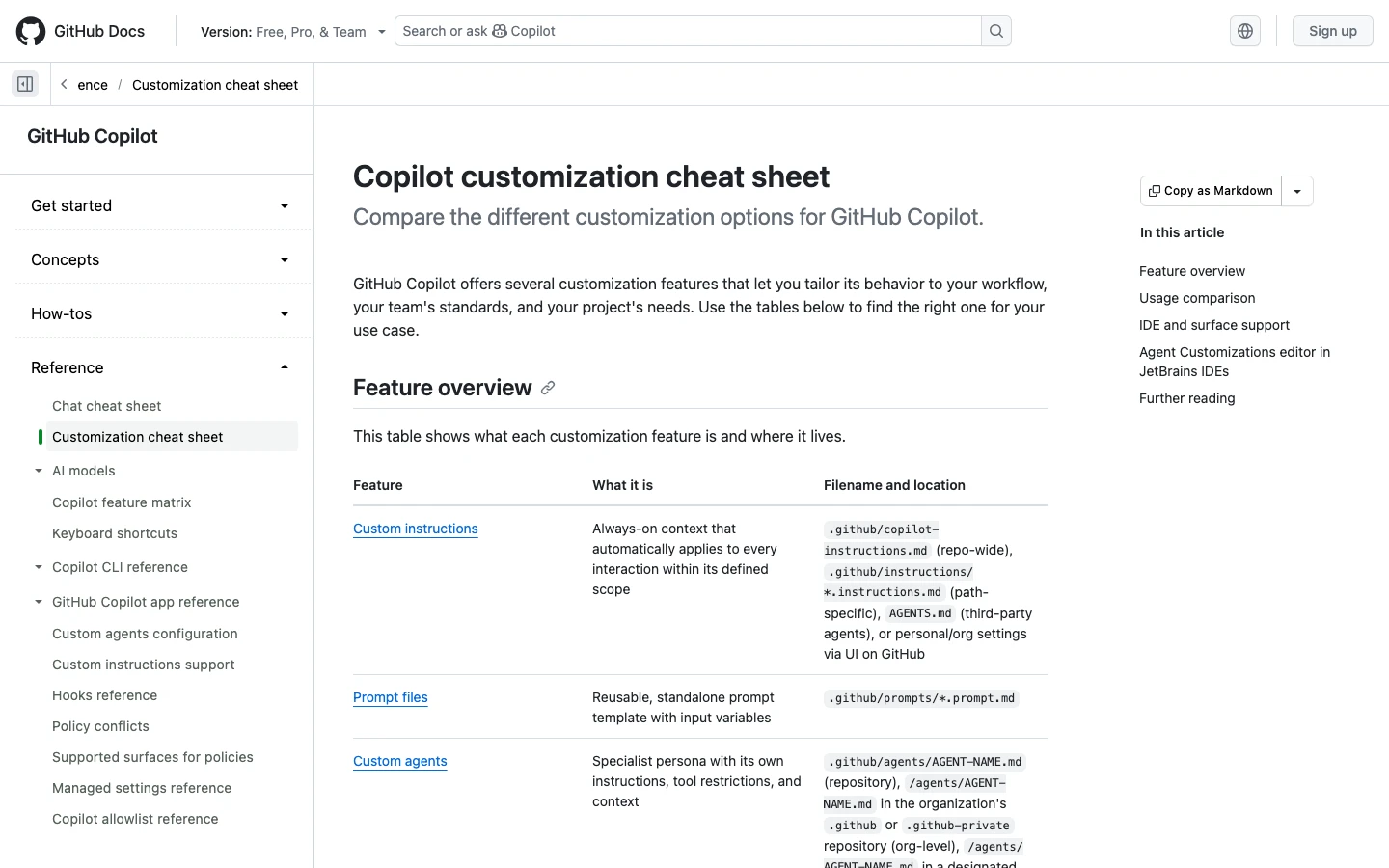
GitHub Copilot does not expose the same depth of lifecycle interception as Cursor or Claude Code by default. Instead, it gives you customization surfaces that act as persistent guardrails. The Copilot customization cheat sheet compares the options and where each file lives.
Screenshot: GitHub Copilot customization cheat sheet, captured August 2026
Custom instructions are a system-prompt-like block that travels with your Copilot context and tells the model how to behave. They live in .github/copilot-instructions.md (repo-wide), .github/instructions/*.instructions.md (path-specific), AGENTS.md o CLAUDE.md (agent instructions), or personal/org settings via the GitHub UI.
Prompt files are reusable prompt templates stored in .github/prompts/*.prompt.md.
Custom agents are specialist personas with their own instructions and tool restrictions, stored in .github/agents/AGENT-NAME.md.
Agent skills are folders of instructions, scripts, and resources loaded when relevant, stored in .github/skills/NAME/SKILL.md.
Hooks are available as a preview feature in limited surfaces (cloud agent and Copilot CLI as of the documentation) and use .github/hooks/*.json files.
Copilot's equivalent of hooks
Custom instructions are the closest Copilot comes to a pre-action hook for most users. You can use them to say "never edit files in infra/ without approval," "always run pytest after changing Python files," or "load ARCHITECTURE.md before proposing refactors." Custom agents can restrict which tools are available to a given agent persona, which approximates a permission gate. The preview hooks feature adds deterministic shell commands at lifecycle events, but support is narrower than Cursor or Claude Code today.
Copilot customization strengths
Tightly integrated with GitHub repos, pull requests, and Actions.
No separate config language to learn beyond markdown prompts for instructions and prompt files.
Skills let you teach Copilot domain abstractions without writing code.
Copilot customization watch-outs
Instructions are suggestions, not enforced gates, unless paired with Actions or preview hooks.
Preview hooks are not yet available in every IDE or surface; check the feature matrix before planning on them.
No true lifecycle interception on most surfaces means you cannot block a shell command or file edit at the platform level in the same way as Cursor or Claude Code.
Teams that live in Cursor and want fine-grained control
Teams running terminal agents under review
GitHub-native teams needing prompt-level guardrails
This table is a starting point, not a final architecture. The best choice often depends on which surface your team already uses eight hours a day.
Practical hook policies every team should start with
Do not try to write a perfect policy on day one. Start with five hooks or instructions that prevent the most common failures:
Block destructive commands. Prevent rm -rf, drop table, kubectl delete, and any credential rotation unless explicitly allowed.
Require tests before completion. The agent cannot call a task done until a targeted test command exits cleanly.
Gate sensitive paths. Any edit to files containing secrets, payment logic, or infrastructure must require human approval.
Load required context first. Before editing packages/api/, the agent must read ARCHITECTURE.md y API_CONVENTIONS.md.
Audit every tool call. Log what the agent tried, what hooks fired, and what was blocked for later review.
These five rules will catch more incidents than the most expensive model upgrade.
How to test hooks before trusting them
A hook that fails silently is worse than no hook at all. Treat hook development like test-driven infrastructure:
Negative tests: create a throwaway branch and ask the agent to do something the hook should block. Confirm it is blocked.
Positive tests: ask the agent to do something the hook should allow. Confirm it proceeds and completes correctly.
Edge cases: test with nested paths, symbolic links, renamed commands, and multi-step prompts that try to bypass the rule.
Version control: commit hooks to the repo and review them in pull requests like any other config.
Team rollout: start with one repo, one team, and one model before expanding to the whole org.
Watch900+ hours of Claude Code and Cursor lessons condensedYouTube
Common mistakes that defeat hooks
Even the best hook system fails when humans undermine it:
Overly broad allow rules. A regex that permits npm run * also permits npm run deploy:production.
Secrets in prompts. If you paste credentials into chat, hooks cannot save you.
Unreviewed auto-merge. A hook that runs tests is not a substitute for human review of agent-authored PRs.
Ignoring hook logs. Logs are only useful if someone reads them after a near miss.
Copy-pasting hooks across repos. A policy written for a Node monorepo may silently do nothing in a Python service.
Selecting the right hooks strategy for your team
Use this decision flow before committing budget and training time:
If your team already works in Cursor and wants to gate agent, tab, and terminal events: start with hooks.json. Treat it as experimental and pin Cursor versions during critical sprints.
If your team runs Claude Code in the terminal and needs shell and tool-level gating: invest in lifecycle hook matchers. Pair them with a strong review culture because terminal agents can still run commands outside the agent if the operator is careless.
If your team is GitHub-native and wants policy guidance rather than enforcement: use Copilot custom instructions, prompt files, and custom agents. Augment with GitHub Actions for anything that must be blocked, not merely discouraged. Monitor the preview hooks documentation as the surface expands.
Most mature organizations will end up using more than one surface. The hooks strategy should match the surface strategy, not the other way around.
Preguntas frecuentes
01Are hooks a replacement for code review?
No. Hooks reduce the probability of a bad action, but they do not replace human review of agent-generated diffs. Think of hooks as guardrails, not approvers.
02Can hooks prevent all agent mistakes?
No. Hooks can block known dangerous patterns, require context, and enforce testing. They cannot anticipate every creative way a model or a prompt can go wrong.
03Do I need to be a platform engineer to write hooks?
For basic gates, no. A senior engineer can write the first version in an afternoon. For complex cross-repo policies or audit integrations, platform or security engineering help is wise.
04Should hooks live in the repo or in user config?
Repo-level config is usually better for teams because it travels with the code and can be reviewed in PRs. User-level config is fine for personal experimentation.
05What is the fastest way to prove hook value?
Pick one high-risk action — for example, editing payment files or running deploy commands — and write a hook that blocks it without approval. Demo the block, then demo the approved path. Nothing convinces leadership faster than seeing a disaster not happen.
What to do next
Inventory the surfaces your team already uses: IDE, terminal, GitHub.
Identify the three highest-risk agent actions in your repos.
Write one blocking hook or instruction for each surface.
Run negative and positive tests in a throwaway repo.
Roll out to one team, measure blocked actions and review time, then expand.