Perplexity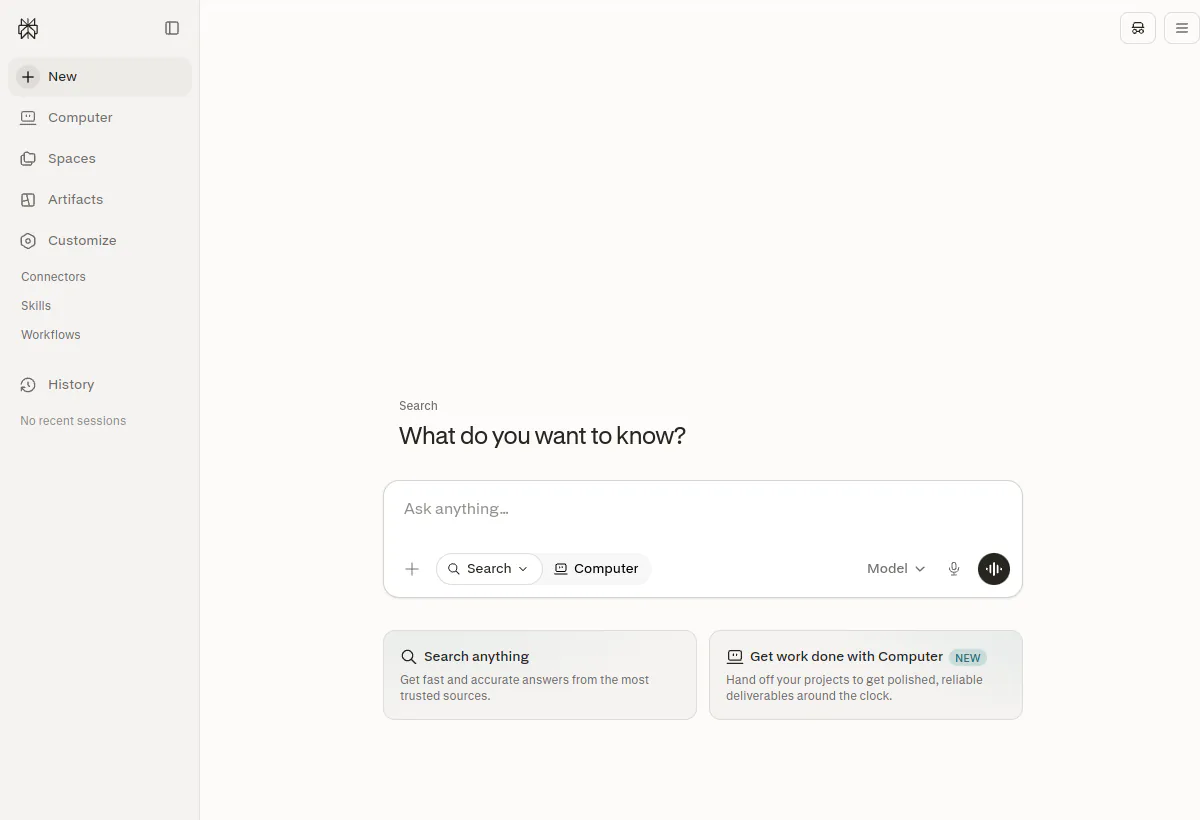
Is Perplexity worth it?
Yes for people who live in sourced answers. Official individual cards, checked August 19, 2026, are Free at $0, Pro at $20 per month or $200 per year, and Max at $200 per month or $2,000 per year. The consumer Pro and Max pages also print annual equivalents of about $17 and $167 per month. Enterprise Pro is $40 per seat per month or $400 per year. Enterprise Max is $325 per seat per month or $3,250 per year. Eligible education and nonprofit discounts on Enterprise Pro are published at $30 per seat per month or $300 per year. Computer is for Pro and Max subscribers (including Enterprise) on desktop, mobile, Slack, and Microsoft 365.
Best for research and supervised web workflows. Computer is not an unattended admin bot. Do not let it submit payments, legal forms, or credentialed changes without a human. Free is enough to learn the citation habit. Daily professional volume usually needs Pro. Computer-heavy days are how people land on Max.
Comment nous avons évalué cela
We scored Perplexity as a cited research engine plus a browser agent, not as a support platform. Weights: citation transparency, Computer usefulness under supervision, plan honesty (Free versus Pro versus Max versus Enterprise seats and credits), org controls, et fit against general chat tools. On August 19, 2026 we read perplexity.ai/hub/pricing, the Pro and Max marketing pages, Enterprise help articles on Pro/Max seat prices, Slack connector docs, and Computer product copy. We did not run an unattended Computer campaign on production accounts.
Modèle de coût
Mix Pro and Max seats. Computer credits are the second meter
The expensive mistake is putting every knowledge worker on Max because Computer looks impressive in a demo. Individual Max is 10x Pro on the monthly sticker ($200 versus $20) and 10x on the annual sticker ($2,000 versus $200). Enterprise Max at $325 is more than 8x Enterprise Pro at $40. Perplexity’s own org messaging says you can mix Enterprise Pro and Max seats. That mix is the procurement design, not a nice-to-have.
Computer adds a credit meter on top of the seat. Official Pro copy lists expanded Computer access and 4,000 bonus credits. Max copy lists maximum Computer usage, 35,000 bonus credits, and 10,000 monthly credits. Help-center credit docs describe auto-top-up triggers (500 credits for Pro, 2,500 for Max) and a Max monthly spending cap that defaults to $200 and can be set up to $5,000. Those numbers are why a “$20 research tool” becomes a variable bill the first month someone asks Computer to fill forms across twenty sites. Limited-time bonus credit offers on the Pro/Max pages (for example extra Computer credits at signup) should be treated as promotions, not as the durable allowance.
- Give Pro to people who ask cited questions all day and only occasionally use Computer.
- Give Max or Enterprise Max to people whose job is Deep Research, Model Council, large file/video generation, or sustained Computer.
- Never share one Max login. Credits and memory are personal. Sharing also wrecks auditability.
- Enterprise Pro at $40 is the admin and SSO step-up from consumer Pro at $20, not a Max substitute.
- Model Computer tasks as minutes of supervision, not as fully automated labor. If a human must watch, the ROI is time saved in gathering, not headcount removed.
Worked example, annual rates, USD, before tax: 15 researchers on Enterprise Pro = 15 × $400 = $6,000 per year ($500 per month). If three of them live in Computer, move those three to Enterprise Max at $3,250: 12 × $400 + 3 × $3,250 = $14,550 per year ($1,212.50 per month). Putting all 15 on Enterprise Max would be 15 × $3,250 = $48,750 per year. The mixed design saves more than $34,000 against an all-Max org without taking Computer away from the people who burn it.
Who Perplexity fits best
Points forts
- Citations in every answer on Free and paid. That is the trust feature. High-stakes work still requires opening the source.
- Model orchestration across third-party models (OpenAI, Google, Anthropic, NVIDIA and others as published). Pro and Max can pick a preferred model. Max adds advanced reasoning models for deep investigations.
- Pro raises limits and adds Computer, premium data (PitchBook, Statista, S&P Capital IQ on Pro/Max), file and app search, and Model Council.
- Computer plans and executes multi-step public-web tasks with visible progress, on desktop, mobile, Slack, and Microsoft 365 for Pro/Max.
- Enterprise seats add org admin, the ability to mix Pro and Max, and published security language (SOC 2 Type II and HIPAA appear in third-party recaps of the FAQ; confirm in the Trust Center for your contract).
Limites à vérifier
- Not a customer-support suite. No ticket SLA, no help-center deflection product. Use Chatbase or a helpdesk.
- Computer requires supervision. Unattended runs on logged-in finance or HR sites are a policy failure, not a feature.
- Academic systematic review depth may still need specialist tools. Perplexity is a fast start, not a methods protocol.
- Free throttles professional volume. Do not staff a research team on Free and call it a deployment.
- Sonar API and Comet browser are related products with separate packaging. Do not assume a Pro seat equals API quota.
Surfaces to verify
Perplexity is a research surface, not a channel support bot. Verify the surfaces your researchers will actually open.
- Web app at perplexity.ai: primary Q&A, threads, collections, file uploads on paid plans.
- Mobile apps for the same answer engine. Confirm Computer availability on your OS.
- Perplexity Computer: agentic browser for multi-step web tasks. Pro/Max. Watch traces. Approve sensitive steps.
- Slack connector for Pro, Max, Enterprise Pro, and Enterprise Max. Admin can disable it.
- Microsoft 365 as a Computer/research surface for paid subscribers, per product copy.
- Comet browser: Chromium-based companion. Packaging is separate from the Pro sticker. Confirm current inclusion.
- API / Sonar: developer meter. Price tokens and search fees separately. A Pro app seat is not an API budget.
- Enterprise admin: seat assignment (mix Pro and Max), SSO and org controls as sold on the Enterprise pages.
Workflow and operating model
The core loop is: ask a question, read the answer, open the citations, keep a decision log. If you skip the source-open step on material questions, you bought a faster hallucination. Collections and threads hold ongoing research. Files and app connectors (Pro+) are how internal PDFs enter the same loop.
Computer is a different loop. You describe a multi-step web task, watch the trace, and approve anything that submits a form, spends money, or uses credentials. Least-privilege accounts only. Never share production passwords with Computer. Never let it run overnight on a logged-in admin session. The official Academy film on this review is a tour of that agent, not a license to unattended finance ops.
- Daily research: cited Q&A, follow-ups, source comparison.
- Deep Research: higher limits on Max. Score report quality against a human literature pass.
- Premium data: PitchBook, Statista, S&P Capital IQ on Pro/Max. Verify your seats actually resolve those sources.
- Computer chores: gather public pages, fill public forms, compare vendor sites. Human in the loop.
- Team knowledge: Enterprise org repository and connectors. Still not a Notion replacement.
Pricing checked August 19, 2026
Perplexity pricing: Free, Pro, Max, Enterprise Pro, Enterprise Max
USD list, before tax. Individual prices from the hub pricing page, Pro/Max pages, and help-center billing articles. Enterprise prices from Perplexity’s Enterprise pricing FAQ, onboarding guide, and Max help article.
| Planifier | Public price | Included capacity / meter | Meilleur ajustement |
|---|---|---|---|
| Gratuit | $0 / month | Search with citations. Limited daily/weekly usage. Basic models. Good for simple questions. No professional Computer packaging. | Trying the answer engine |
| Pro | $20 / month or $200 / yearAbout $17 / month on annual billing as printed on perplexity.ai/pro. | Higher limits, Computer (expanded), 4,000 bonus credits on current Pro copy, premium data sources, files and apps, model choice, Model Council. Limited-time extra Computer credits may appear at signup. | Daily individual research |
| Max. | $200 / month or $2,000 / yearAbout $167 / month annual as printed on perplexity.ai/max. Annual billing for Max is described as web-app in help articles. | Everything in Pro plus higher Deep Research, asset generation, file, and video limits. Maximum Computer. 35,000 bonus credits and 10,000 monthly credits on current Max copy. Advanced reasoning models. Default credit spend cap $200, adjustable up to $5,000 per help-center credit docs. | Heavy individual Computer and Deep Research |
| Enterprise Pro | $40 / seat / month or $400 / yearEducation/nonprofit: $30 / month or $300 / year where eligible. | Org admin, mixable with Max seats, Pro-class research and Computer packaging inside an enterprise workspace. Confirm live search and Deep Research allotments in-account (third-party recaps mention weekly Pro search caps; we treat the in-app quota as source of truth). | Teams that need SSO/admin on a Pro-class seat |
| Enterprise Max | $325 / seat / month or $3,250 / year | Max-class research and Computer inside the org, assignable per member. Mix with Enterprise Pro. Discounts may exist for large teams (250+), schools, and other programs. Confirm in sales or admin. | Power researchers inside a governed org |
Sources: Perplexity hub pricing, Perplexity Pro, Perplexity Max, Enterprise pricing FAQ, What is Enterprise Max?, et Perplexity Max help. Confirm live credits, Computer packaging, and taxes in checkout. Promotional bonus credits change.
AI capability, citations, and Computer
Perplexity’s model layer is an orchestrator. Free uses basic models with a weekly cap. Pro and Max can select a preferred model and use Model Council. Max adds advanced reasoning models for large investigations. The brand names (ChatGPT, Gemini, Claude, Nemotron) will change. Your test should freeze a week of questions and score citation validity, not chase the newest model string.
Citations are necessary and not sufficient. A confident answer with three links can still misread a table. Measure source-open rate and contradiction rate on your topics (pricing pages, medical-adjacent consumer content, legal secondary sources). Discard high-stakes answers that you did not spot-check.
Computer should be scored on completion rate, supervision minutes, and recovery from failed clicks. It is an agentic browser, not a guarantee. Anything with a shopping cart, a wire, or an HR record needs a written ban list.
Domaines de fonctionnalités à vérifier
On the plan you will pay for: cited Q&A, collections/threads, file upload, Pro Search limits, Deep Research, Labs/asset generation, Model Council, preferred-model picker, premium data sources, Computer traces and approvals, Slack connector, Microsoft 365, org admin and mixed seats, credit dashboard and spend cap, memory (Brain) training policy. Do not accept a generic “unlimited research” slide.
Analyse et visibilité opérationnelle
Track source-open rate, answer accept rate, Computer tasks completed with versus without intervention, and credit burn per person. Enterprise admins should watch mixed-seat assignment so Max is not the default. Seat count without weekly researchers is vanity. Credit auto-top-up without a cap is how Max’s $200 default spend limit becomes a $5,000 month.
Security, data handling, and compliance
Do not paste secrets into research prompts. For Computer, use least-privilege accounts and supervise sensitive sites. Enterprise pages point at a Trust Center. Request SOC reports, subprocessors, retention, and whether org content trains models. Help copy states models are not trained on what Brain writes into memory. Still get that in the DPA. HIPAA and SOC 2 Type II language appears in Enterprise materials. Confirm applicability to your tenant rather than assuming a healthcare clearance from a pricing FAQ.
- Ban Computer from production admin consoles and from personal banking.
- Turn Slack connectors off until legal has read the scopes.
- Set Max credit caps in policy, not only in the default $200 UI.
- Revoke seats the same day someone leaves. Mixed Pro/Max orgs accumulate zombie Max seats at $325.
What questions should you ask before buying Perplexity?
- Do we need Pro daily, or is Free enough for this team’s question volume?
- Which Computer tasks are in scope, and which are banned?
- What is the live credit grant and auto-top-up setting on Pro versus Max?
- Can we mix Enterprise Pro and Max in one org, and who approves Max assignment?
- Which premium data sources resolve on our seats?
- Is annual Max billing available in our client (web versus mobile)?
- What trains on our queries, files, and Brain memory?
- How do we export thread history for a regulated research file?
What red flags should you watch for with Perplexity?
- No habit of opening citations on material questions.
- Unattended Computer on credentialed accounts.
- All-Max seating because a demo used Deep Research once.
- Shared logins to “save seats.”
- Treating Perplexity as the on-site support widget.
- Ignoring credit spend caps on Max.
What are the best alternatives to Perplexity?
Perplexity is not listed as an alternative to itself. Pick by the job you will measure.
- ChatGPTChoose ChatGPT when you need a general workplace agent (Work, Codex, images, connectors) more than a citation-first research engine.
- ClaudeChoose Claude when the corpus is long documents and code, and you want Claude Code or Cowork rather than a live-web answer engine.
- Notion AIChoose Notion AI when the knowledge already lives in Notion and the job is workspace agents, not public-web research.
- CursorChoose Cursor when the job is repo-aware software engineering, not sourced Q&A.
- ChatbaseChoose Chatbase when customers need a website or messaging support agent trained on your help content.
Test in practice
What Perplexity needs to prove in a real workflow
- Score 20 real questions.Record citation validity and whether a human still had to open the source. Keep the same set for ChatGPT and Claude.
- Pilot five Computer tasks.Public-web only. Time supervision. Ban payments and logins.
- Read the credit dashboard.After one week, see whether Pro credits hold or whether those users belong on Max.
- Then choose seating.Free versus Pro versus mixed Enterprise Pro/Max. Do not default the org to $325 seats.
Lecture connexe
Lecture connexe
Official product demo
See Perplexity Computer before you trust the claims
This official Perplexity Academy film is already on the live review. Treat it as a tour of Computer, not proof it can run unattended on your accounts. Repeat five tasks with a human watching.
Grand livre des réclamations et des sources
Sur quoi ce profil est basé
Official hub pricing, Pro, Max, homepage, and Computer pages checked August 19, 2026. Help-center articles for Max at $200 monthly / $2,000 annually, Enterprise Pro at $40 / $400 year, Enterprise Max at $325 / $3,250 year, mixed seats, education $30 / $300, Slack connector eligibility, and credit spend-cap language. Existing official Computer YouTube embed.
Ce que nous n'avons pas vérifié
We did not complete checkout in every country, so taxes and local currency can differ. We did not measure Computer success on a labeled task set. Exact in-app weekly Pro search counts can differ from third-party recaps. Sonar API rates were not the focus of this app review. Promotional Computer credit bundles change and should be ignored in a 12-month model unless they are in the order form.
Comment nous avons évalué l'adéquation
Editorial fit weights citation habit, Computer under supervision, and whether mixed Pro/Max seats beat an all-Max org. It is not a factual-accuracy benchmark across all topics. Light users score Free. Daily researchers score Pro. Computer-heavy users score Max. Orgs that need admin score Enterprise Pro, with Max assigned, not defaulted.
Should you choose Perplexity?
Choose Perplexity when sourced web answers and supervised Computer time are the job. Pro at $20 (or $200 year) is the professional floor. Max at $200 (or $2,000 year) is for people who empty Pro credits. Enterprise Pro at $40 and Enterprise Max at $325 are the org versions of that mix. Do not default every seat to Max.
Skip it as a support platform, as an IDE, and as unattended browser automation on sensitive accounts. Re-check perplexity.ai/hub/pricing during legal review. Name credits, Computer policy, and mixed-seat rules in the contract.
FAQ
Questions courantes
How much does Perplexity Pro cost?
$20 per month or $200 per year as of August 19, 2026. The Pro page also prints about $17 per month when billed annually. That is the individual plan, not Enterprise Pro.
How much does Perplexity Max cost?
$200 per month or $2,000 per year on help-center billing copy. The Max page prints about $167 per month billed annually. Help articles note annual Max billing may be web-app only. Confirm in checkout.
What does Enterprise cost?
Enterprise Pro is $40 per seat per month or $400 per year. Enterprise Max is $325 per seat per month or $3,250 per year. Orgs can mix seats. Eligible education and nonprofits can get Enterprise Pro at $30 / $300 year.
What is Perplexity Computer?
An agentic browser that plans and runs multi-step web tasks with visible progress. Available to Pro and Max (including Enterprise) on desktop, mobile, Slack, and Microsoft 365. Supervise it. Do not give it production admin sessions.
Is Free enough?
For light, simple questions with citations. Daily professional research usually needs Pro. Computer is a paid-plan feature in the current packaging.
Can Perplexity replace a website support chatbot?
No. Use Chatbase or a helpdesk agent. Perplexity is a research surface for staff, not a customer inbox.
Perplexity vs ChatGPT for research?
Choose Perplexity when inline citations and Computer on the public web are the product. Choose ChatGPT when you also need Work deliverables, Codex, and a broader workplace agent. Many teams keep both and split the jobs.
Do we need Max for the whole company?
No. Mix. Max is for people who burn Computer credits and Deep Research. Everyone else can sit on Pro or Enterprise Pro. All-Max is how a $40 problem becomes a $325 problem.
Who should skip Perplexity?
Teams that need a support widget, an IDE, or a Notion-style workspace OS. Also skip Computer if nobody will watch the trace. An unsupervised browser agent is a security process, not a productivity win.
Also review