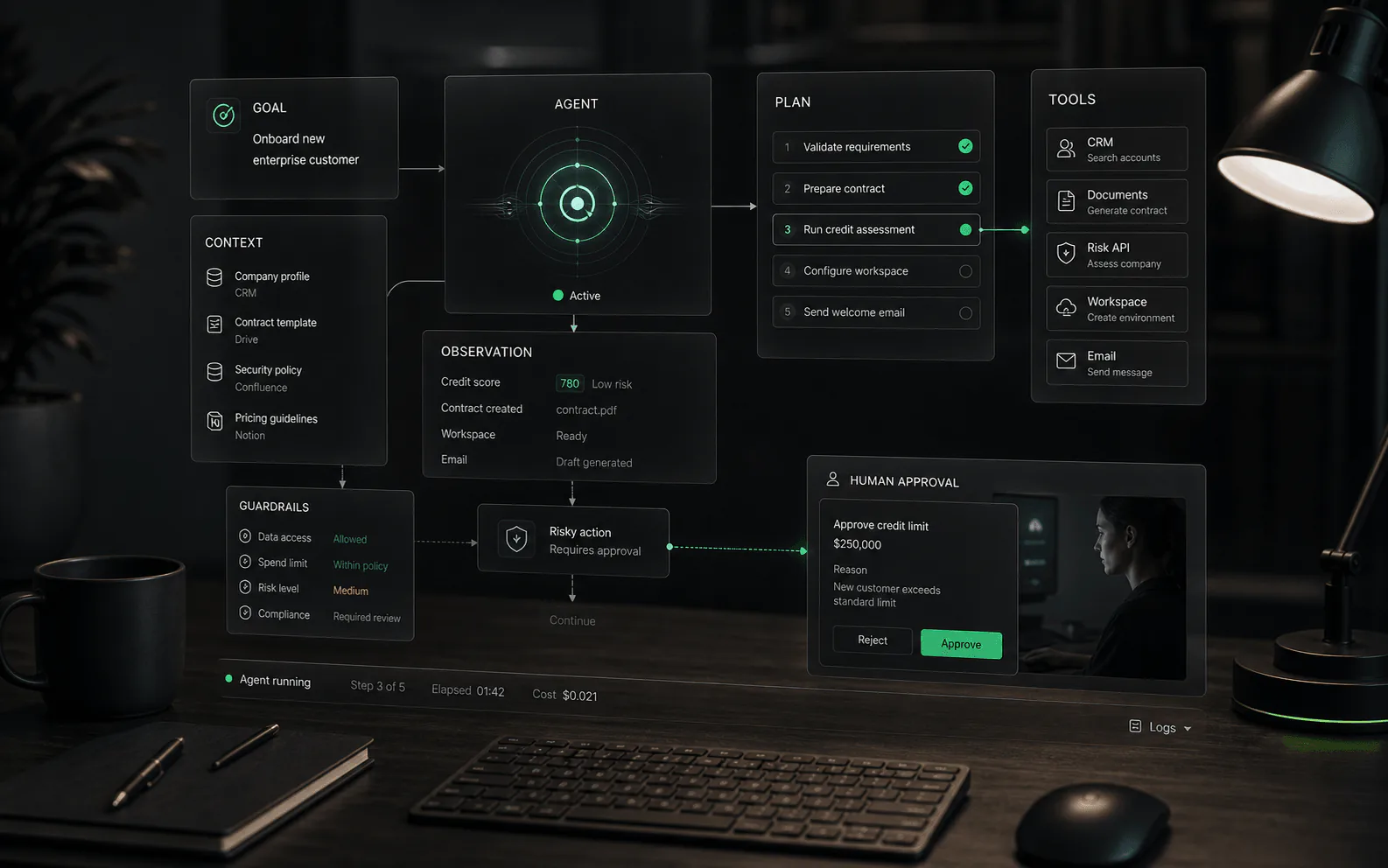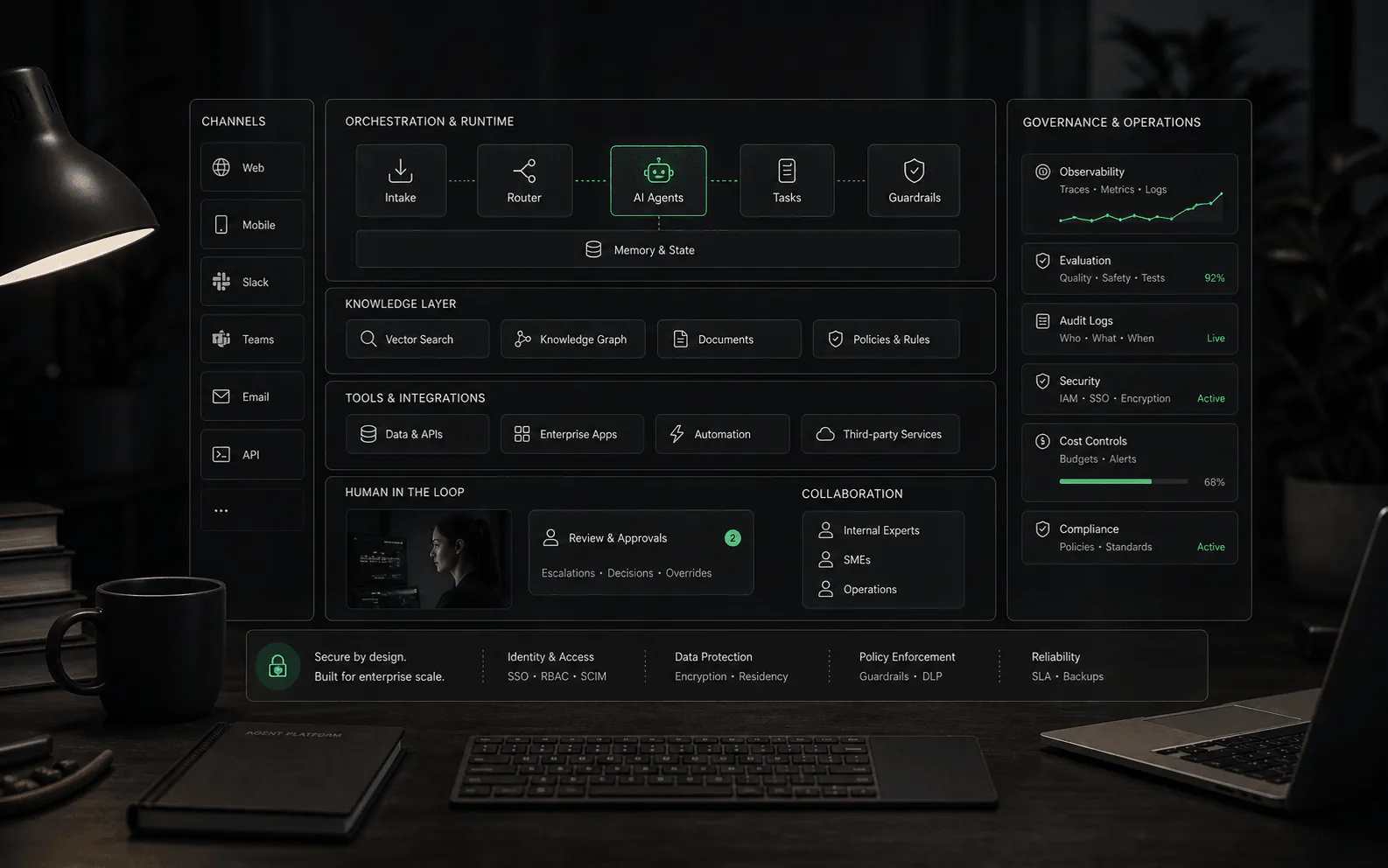
What a platform should provide
A real AI agent platform is more than a model wrapper or a chat widget. It should give teams a controlled operating layer for knowledge sources, channels, integrations, workflow rules, permissions, testing, analytics, human handoff, and continuous improvement. The platform is where the business decides what agents know, what they can do, where they appear, and how humans supervise them.
How the platform layer works
- Design layer: teams define agent goals, instructions, allowed tools, workflow steps, escalation rules, and test cases.
- Knowledge layer: the platform connects approved sources, manages updates, and gives teams a way to identify stale or missing information.
- Execution layer: the agent runs conversations or workflows, calls tools, manages state, and handles retries or failures.
- Control layer: roles, permissions, approval gates, audit logs, environment separation, and policy rules keep automation bounded.
- Measurement layer: analytics show quality, unresolved topics, handoffs, tool failures, costs, and outcomes by workflow or channel.
When a platform is worth evaluating
- You need agents across more than one channel, such as website chat, email, WhatsApp, helpdesk, ecommerce, or internal tools.
- The agent must use business-specific knowledge instead of only answering broad questions.
- The workflow includes actions such as routing, tagging, drafting, updating records, collecting missing details, or triggering approved steps.
- Managers need reporting on answer quality, deflection, escalations, unresolved topics, and workflow failures.
- Security, permissions, and human review matter because the agent touches customer data, orders, billing, accounts, or operational systems.
Build versus buy questions
Teams can build agent workflows directly on model APIs and orchestration frameworks, but they still need the operational pieces a platform normally provides: identity, permissions, connectors, evaluation, logging, rollback, human review, analytics, and support workflows. Buying a platform may reduce implementation burden, while building may offer deeper control. The practical question is which side your team is better equipped to own for the next two years, not which path sounds more flexible in a demo.
Core capabilities to inspect
- Knowledge management: source ingestion, refresh frequency, conflict handling, permissions, and content review.
- Agent design: prompt controls, workflow steps, fallback behavior, testing tools, and environment separation.
- Integrations: whether connections are read-only, write-capable, event-driven, or limited to simple handoff.
- Channel deployment: where the agent can appear and whether behavior can vary by channel or customer segment.
- Human control: approval gates, escalation routing, reviewer permissions, and audit trails.
- Analytics: unresolved questions, source gaps, action failures, containment quality, and human takeover patterns.
Governance requirements
- Role-based access: different people should have different rights to edit agents, approve workflows, view transcripts, manage sources, and configure integrations.
- Version history: teams need to know which prompt, workflow, source set, or integration version produced a given answer or action.
- Environment separation: testing, staging, and production should not blur together when agents can touch customer-facing workflows.
- Approval controls: sensitive actions should support review gates instead of relying only on written policy.
- Audit trails: the platform should record what the agent saw, what it retrieved, what it attempted, what a human changed, and what happened next.
Security and compliance
AI agent platforms increasingly handle sensitive customer data, making security and compliance a core evaluation criterion rather than an afterthought. Buyers should verify certifications, data handling practices, and compliance posture before committing to a platform.
- SOC 2 Type II: The baseline expectation for platforms handling customer conversations. SOC 2 Type I certifies a point-in-time assessment; Type II covers operational effectiveness over time. Ask for the most recent audit report and review any exceptions or carve-outs.
- HIPAA compliance: Required for healthcare use cases. Verify Business Associate Agreement (BAA) availability, covered vs. excluded services, and whether the platform supports HIPAA-required access controls and audit logging. Some platforms offer HIPAA compliance only on specific plans or deployments.
- GDPR and data protection: Essential for European customers or any business processing EU resident data. Check for data processing agreements, Data Protection Impact Assessment (DPIA) support, right-to-erasure implementation, and clear data retention policies.
- Data residency: Many organizations require data to remain within specific jurisdictions. Verify whether the platform offers regional deployment options, where training data and conversation logs are stored, and whether data crosses borders for processing or model improvement.
- Infrastructure security: Review encryption at rest and in transit, key management practices, network segmentation, and incident response procedures. Platforms built on major cloud providers (AWS, Azure, GCP) often inherit baseline security controls.
- Vendor security audits: For enterprise deployments, the platform should support security questionnaires, penetration test reports, and ongoing vulnerability disclosure programs. Some platforms publish transparency reports; others require NDA for detailed security documentation.
What to ask: Request the platform's security documentation before sharing any production data. A vendor that cannot provide SOC 2, cannot clarify data residency, or cannot explain how conversation data trains their underlying models may introduce compliance risk that outweighs feature advantages.
Integration standards
AI agent platforms derive value from their ability to connect business systems and take meaningful actions. The depth and reliability of integrations often determines practical success more than model capabilities.
- API patterns: Modern platforms should offer RESTful APIs with clear authentication (OAuth 2.0, API keys), rate limiting documentation, and versioned endpoints. GraphQL support can reduce integration complexity for complex data queries. Webhook support enables real-time event-driven workflows rather than polling-based integrations.
- Model Context Protocol (MCP): An emerging standard for connecting AI agents to external tools and data sources. Platforms supporting MCP can potentially use a growing ecosystem of pre-built connectors. Ask whether the platform supports MCP server implementation or if integrations remain proprietary.
- OpenAPI specifications: Platforms that expose OpenAPI (Swagger) specifications make it easier for development teams to understand available endpoints, generate client code, and validate integration contracts. Lack of OpenAPI support may indicate an immature API surface.
- Native connectors: Evaluate the breadth and depth of native integrations. A platform may list 100+ integrations, but buyers should verify: read vs. write capabilities, action scope (can the agent create records or only read them?), error handling, and whether the integration is maintained by the platform or a third party.
- Custom integration support: For systems without native connectors, evaluate the platform's ability to call custom webhooks, accept structured webhooks from external systems, or integrate via middleware like Zapier, Make, or iPaaS platforms.
- Integration testing: The platform should provide sandbox or test environments for integration development. Production integrations should not be the first place an integration is validated.
What to verify: Request documentation for your top 3-5 required integrations. Check whether the integration supports your workflow (e.g., can the agent update a Salesforce opportunity stage, or only read contact information?). Ask about rate limit handling, retry behavior, and how the platform reports integration failures.
Vendor lock-in and exit strategy
AI agent platforms become deeply embedded in business operations. The cost of switching platforms can be substantial, making exit strategy evaluation critical before procurement.
- Data portability: Verify what data you can export: conversation transcripts, knowledge base content, agent configurations, workflow definitions, analytics reports, and user feedback. Export formats matter: structured exports (JSON, CSV) are more useful than PDFs or proprietary formats.
- Migration paths: Ask how long it would take to migrate to another platform. Key questions: Can conversation history transfer? Can agent prompts and workflows export in usable formats? Can knowledge bases be extracted and imported elsewhere? Some platforms make export easy; others require manual reconstruction.
- Proprietary capabilities: Platforms with proprietary models, custom prompt syntax, unique knowledge representations, or platform-specific workflow languages increase migration complexity. Evaluate whether core capabilities rely on open standards or vendor-specific implementations.
- Training data retention: Clarify whether your conversation data, knowledge base content, or custom training data is used to improve the platform's underlying models. Some enterprises require data isolation from model training as a contractual obligation.
- Contract and pricing lock-in: Review minimum commitment periods, volume commitments, and pricing escalations. Annual contracts are common; multi-year commitments with accelerating minimums create financial lock-in that compounds technical migration costs.
- Switching costs: Model the full cost of exit: staff time for migration, dual-platform operation during transition, potential customer experience disruption during migration, and learning curve for new platform operations.
Practical guidance: Before signing, run a "fire drill" export. Try exporting your agent configuration, knowledge base, and sample conversations. If the export is incomplete, requires vendor support, or produces unusable formats, that's a signal about future mobility. The best time to discover export limitations is before commitment, not during an exit.
Evaluation and testing infrastructure
AI agent quality is not static. Production agents require ongoing evaluation, testing, and iteration. Platforms that lack evaluation infrastructure force teams to build their own or fly blind.
- Evaluation sets: The platform should support creating and maintaining test datasets with expected outputs. Evaluation sets enable consistent quality measurement across prompt changes, model updates, and workflow modifications. Without evaluation sets, teams cannot objectively measure whether a change improved or degraded performance.
- Regression testing: Every prompt change, knowledge base update, or workflow modification risks breaking previously working behavior. Regression testing identifies unintended consequences before they reach production. The platform should show which test cases passed or failed after a change.
- A/B testing: Compare agent variants in controlled experiments. A/B testing enables data-driven decisions about prompt changes, model selection, or workflow alternatives. The platform should split traffic, measure outcomes, and report statistical significance.
- Human evaluation: Not all quality signals are automatic. Platforms should support human review workflows for evaluating answer quality, safety, and appropriateness. This includes sampling conversations, structured review forms, and inter-rater reliability metrics.
- Automated quality metrics: Useful metrics include answer relevance, factual accuracy (groundedness), safety classifiers, latency percentiles, and containment rates. Platforms vary in which metrics they expose and whether they're computed automatically or require manual configuration.
- Test environment separation: Development and testing should not affect production analytics or customer conversations. The platform should maintain separate environments with controlled promotion paths.
What to demand: Ask vendors for a demonstration of their evaluation workflow. Can they show how to create a test set, make a prompt change, run regression tests, and understand results? If evaluation is manual, ad-hoc, or absent, the platform may work for prototypes but struggle in production.
Deployment considerations
Where and how an AI agent platform runs affects security, compliance, performance, and operational control. Buyers should match deployment models to organizational requirements.
- Cloud SaaS: The default model for most platforms. Advantages: managed infrastructure, automatic updates, minimal operational overhead. Considerations: data residency may be limited, integration with on-premises systems may require network configuration, and platform outages affect availability.
- Hybrid deployment: Some platforms support keeping sensitive data or specific workloads on-premises while using cloud for other capabilities. This model can satisfy data residency requirements while maintaining cloud benefits for less sensitive operations.
- On-premises or self-hosted: Full control over infrastructure and data. Advantages: maximum data sovereignty, custom security configurations, air-gapped deployment for high-security environments. Considerations: significant operational overhead, update management, scalability limits, and potentially higher total cost.
- Multi-tenant vs. single-tenant: Multi-tenant platforms share infrastructure across customers; single-tenant deployments provide isolated infrastructure. Single-tenant offers more isolation and control but typically at higher cost. Evaluate whether multi-tenant isolation meets your security and compliance requirements.
- Regional deployment: For global organizations, evaluate whether the platform can deploy instances in multiple regions for latency optimization, data residency compliance, or disaster recovery. Some platforms offer regional selection; others process all data through a single region.
- BYOC (Bring Your Own Cloud): Some platforms support deployment within your own cloud account (AWS, Azure, GCP). This provides more infrastructure control while still using the platform's software. Evaluate configuration requirements, maintenance responsibility boundaries, and cost implications.
What to assess: Match deployment model to requirements. If you need SOC 2, HIPAA, and EU data residency, verify the platform supports all three simultaneously. Some platforms offer compliance certifications only on specific deployment models or pricing tiers.
Pricing model comparison
AI agent platform pricing models vary significantly, making direct comparison challenging. Understanding pricing structures helps buyers model total cost of ownership accurately.
- Per-seat pricing: Fixed cost per team member or admin. Advantages: predictable costs, easy budgeting. Considerations: may not scale well for large teams, pricing can escalate quickly if many people need access. Verify what seat types exist (admin vs. reviewer vs. analytics-only) and whether pricing varies by role.
- Per-conversation pricing: Cost per conversation session, regardless of length or outcome. Advantages: simple to understand. Considerations: conversation definition varies by platform, costs can be unpredictable with volume spikes, may not account for conversation complexity or resolution quality.
- Per-message or per-interaction pricing: Cost per individual message or interaction turn. Advantages: direct correlation to usage. Considerations: long conversations become expensive, may incentivize truncating helpful interactions, pricing can be hard to forecast.
- Per-resolution pricing: Cost per successfully resolved conversation. Advantages: aligns cost with outcomes. Considerations: resolution definition matters (what counts as resolved?), may incentivize platform to mark borderline cases as resolved, human handoffs may not count toward resolution metrics.
- Usage-based pricing: Cost tied to model tokens, API calls, or compute consumption. Advantages: pay for what you use. Considerations: costs can be highly variable, complex to forecast, may require careful monitoring to avoid budget overruns.
- Hidden costs: Beyond base pricing, account for: implementation services, custom integration development, premium support tiers, training and onboarding, analytics add-ons, compliance certifications (sometimes extra), and overage charges for exceeding plan limits.
Modeling guidance: Build a cost model based on your projected usage: expected monthly conversations, average conversation length, number of team members requiring access, integration complexity, analytics requirements, and support needs. Apply vendor pricing to your model rather than comparing advertised rates. Ask vendors for pricing on your specific workload, not generic examples.
Red flags: Pricing that seems too good to be true often excludes hidden costs. Verify what's included in base pricing, what requires upgrade, and whether there are hard caps or overage charges. A low per-seat price can become expensive if it excludes essential features like analytics, testing, or compliance.
Implementation questions
- Who owns the knowledge base after launch, and how are stale or conflicting answers fixed?
- Can teams test agents against real edge cases before public deployment?
- How are sensitive workflows restricted, approved, or escalated?
- What happens when the agent cannot answer, cannot complete an action, or receives hostile or ambiguous input?
- Can reporting distinguish between a resolved issue, a deflected issue, a bad answer, and a handoff that still required human cleanup?
Platform evaluation tests
- Run the same real workflow across two channels and verify whether the platform preserves behavior, reporting, and handoff context.
- Change a knowledge source and confirm how quickly the live agent reflects the update after review.
- Create a low-confidence or conflicting-source scenario and inspect escalation, logs, and analytics.
- Ask for a rollback demonstration after a bad workflow change.
- Test an integration failure and confirm whether duplicate actions, partial updates, and retries are visible to operators.
What is not a platform
- A standalone model API is not a platform by itself. It may generate text, but the buyer still needs workflow configuration, permissions, deployment surfaces, monitoring, and human review.
- A website chat widget is not necessarily a platform. It may become part of one, but buyers should verify whether it can support multiple workflows, roles, sources, channels, and operational reporting.
- A collection of integrations is not enough. The platform should define how agents use those integrations safely, how failures are handled, and how humans audit attempted actions.
- A dashboard with conversation counts is not governance. Mature operations need version history, approval controls, review queues, and enough evidence to understand why the agent behaved as it did.
Pricing and operating model
Platform pricing can be hard to compare because vendors may charge by seat, conversation, resolution, message volume, usage, channel, integration, or add-on capability. Buyers should model cost against expected volume and operating reality: who configures the agent, who reviews conversations, how often knowledge changes, and which workflows require human approval.
Metrics a platform should expose
A useful platform should make it possible to inspect quality and economics by agent, workflow, channel, source, team, and version. Look for resolved workflow rate, reviewed answer accuracy, escalation accuracy, handoff cleanup rate, integration failure rate, average tool calls per workflow, cost per successful outcome, latency, unresolved-topic clusters, and changes in performance after a source or workflow update.
Red flags in platform demos
Be skeptical of demos that show only perfect knowledge, only one channel, or only a simple website assistant while claiming broad workflow automation. Other warning signs include shallow reporting, unclear handoff behavior, no permission model, no testing environment, no source visibility, and integrations that sound deep but only pass a transcript to another system.
Related concepts
The platform decision connects several layers: AI agents define the work unit, RAG shapes how business knowledge is retrieved, human-in-the-loop controls define review boundaries, and evaluation methodology defines whether the rollout is improving business outcomes. Treat the platform as operating infrastructure, not as a prettier interface for a model.
Rollout maturity
A mature platform rollout usually starts narrow and becomes broader only after the team proves quality, cost, and control. A practical first phase might use read-only context, limited channels, explicit human fallback, and weekly QA. Later phases can add write actions, more channels, segmented permissions, deeper analytics, and workflow-specific optimization. Buyers should prefer vendors that can support this staged path over vendors that push immediate broad automation.
Ownership after launch
The hardest platform questions often appear after procurement. Support operations may own conversation quality, IT may own integrations and access, product teams may own source content, and leadership may own risk appetite. Buyers should clarify ownership before launch: who approves agent changes, who reviews failures, who can pause automation, who handles integration outages, and who decides when a workflow is mature enough to expand. That operating map matters as much as the feature list.
Sources to verify
Use these references to understand the term and pressure-test vendor claims. Product-specific details still need to be verified against current vendor materials.
FAQ
Common questions
Who needs an AI agent platform?
Teams that want to manage AI agents across multiple workflows, channels, or departments usually need a platform. A narrow chatbot tool may be enough for simple website Q&A.
What should buyers verify before choosing a platform?
Verify supported channels, knowledge sources, integrations, human handoff, analytics, permissions, implementation effort, and current pricing directly with the vendor.
Is a single chatbot tool enough?
It can be enough for narrow website Q&A or lead capture. A platform becomes more relevant when the work spans channels, systems, permissions, reporting, and human review.
How is an AI agent platform different from an LLM API?
An LLM API gives a team access to a model. An AI agent platform should add the operating layer around that model: workflow configuration, knowledge management, tool connections, channel deployment, permissions, evaluation, human review, analytics, and audit trails. Teams can build those pieces themselves, but they still need them for production workflows.
What is the difference between an AI agent platform and workflow automation?
Traditional workflow automation usually follows deterministic rules: if this event happens, do that action. An AI agent platform may include workflow automation, but it also needs context interpretation, knowledge retrieval, tool use, fallback behavior, and review controls for cases that are not perfectly scripted. Buyers should verify whether the platform handles ambiguity or only routes predefined cases.
Should a company build or buy an AI agent platform?
Build when the team has strong engineering capacity, deep integration needs, and a clear plan for permissions, evaluation, monitoring, and support. Buy when speed, managed connectors, admin controls, and operational tooling matter more than custom architecture. In both cases, the real cost includes knowledge maintenance, human review, testing, analytics, and ongoing workflow ownership.
What capabilities should an AI agent platform include?
A serious platform should support agent design, approved knowledge sources, tool and system integrations, channel deployment, role-based access, testing environments, approval gates, audit logs, reporting, and improvement workflows. Not every buyer needs every capability on day one, but missing governance and observability become painful as agents move into higher-risk work.
How should buyers compare AI agent platform pricing?
Compare the cost of the operating model, not only the entry plan. Model expected conversations, message volume, tool calls, human review time, premium channels, seats, add-ons, analytics needs, and implementation work. Pricing can look low in a simple demo but change materially when real workflow volume and review requirements are included.
What is a red flag in an AI agent platform demo?
A red flag is a demo that shows a perfect answer but hides source retrieval, permissions, failure handling, audit logs, rollback, or human handoff. Another warning sign is an integration list that sounds deep but only passes transcripts or webhooks without clear controls around what the agent can read or change.
What security certifications should buyers require?
SOC 2 Type II is the baseline for platforms handling customer data. For healthcare, HIPAA compliance and a Business Associate Agreement (BAA) are essential. For European data processing, GDPR compliance and clear data processing agreements are required. Ask for audit reports, verify scope, and review any carve-outs or exceptions before sharing production data.
How do I evaluate data residency requirements?
Determine which jurisdictions require local data storage (e.g., EU, certain countries, regulated industries). Ask vendors where conversation logs, training data, and knowledge bases are stored, whether data crosses borders for processing, and whether they offer regional deployment options. Verify the platform can meet all your residency requirements simultaneously.
What are the hidden costs in platform pricing?
Beyond advertised rates, account for: implementation services, custom integration development, premium support tiers, analytics add-ons, compliance certifications (sometimes extra), overage charges, training costs, and the operational cost of maintaining knowledge bases and reviewing conversations. Build a total cost model based on your projected workload.
What is Model Context Protocol (MCP) and why does it matter?
MCP is an emerging open standard for connecting AI agents to external tools and data sources. Platforms supporting MCP can potentially use a growing ecosystem of pre-built connectors rather than relying solely on proprietary integrations. Ask whether the platform supports MCP or if integrations remain vendor-specific.
How do I evaluate vendor lock-in risk?
Before committing, run a "fire drill" export: try exporting agent configurations, knowledge bases, and sample conversations. Verify export formats are usable (JSON, CSV) not proprietary. Check whether conversation history can transfer, whether prompts use proprietary syntax, and whether your data trains the vendor's models. Poor export capability signals future mobility constraints.
What evaluation capabilities should a platform have?
Production-ready platforms should support: evaluation sets (test datasets with expected outputs), regression testing (identify broken behavior after changes), A/B testing (compare variants with statistical significance), human evaluation workflows, automated quality metrics (relevance, groundedness, safety), and separate test environments. Without these, teams cannot objectively measure quality improvement.
What deployment model fits my requirements?
Match deployment to constraints: cloud SaaS for simplicity and managed operations; hybrid for partial data residency control; on-premises for maximum sovereignty (but higher operational burden); single-tenant for isolation requirements; BYOC (bring your own cloud) for infrastructure control with platform software. Verify compliance certifications apply to your chosen deployment model.