What it means operationally
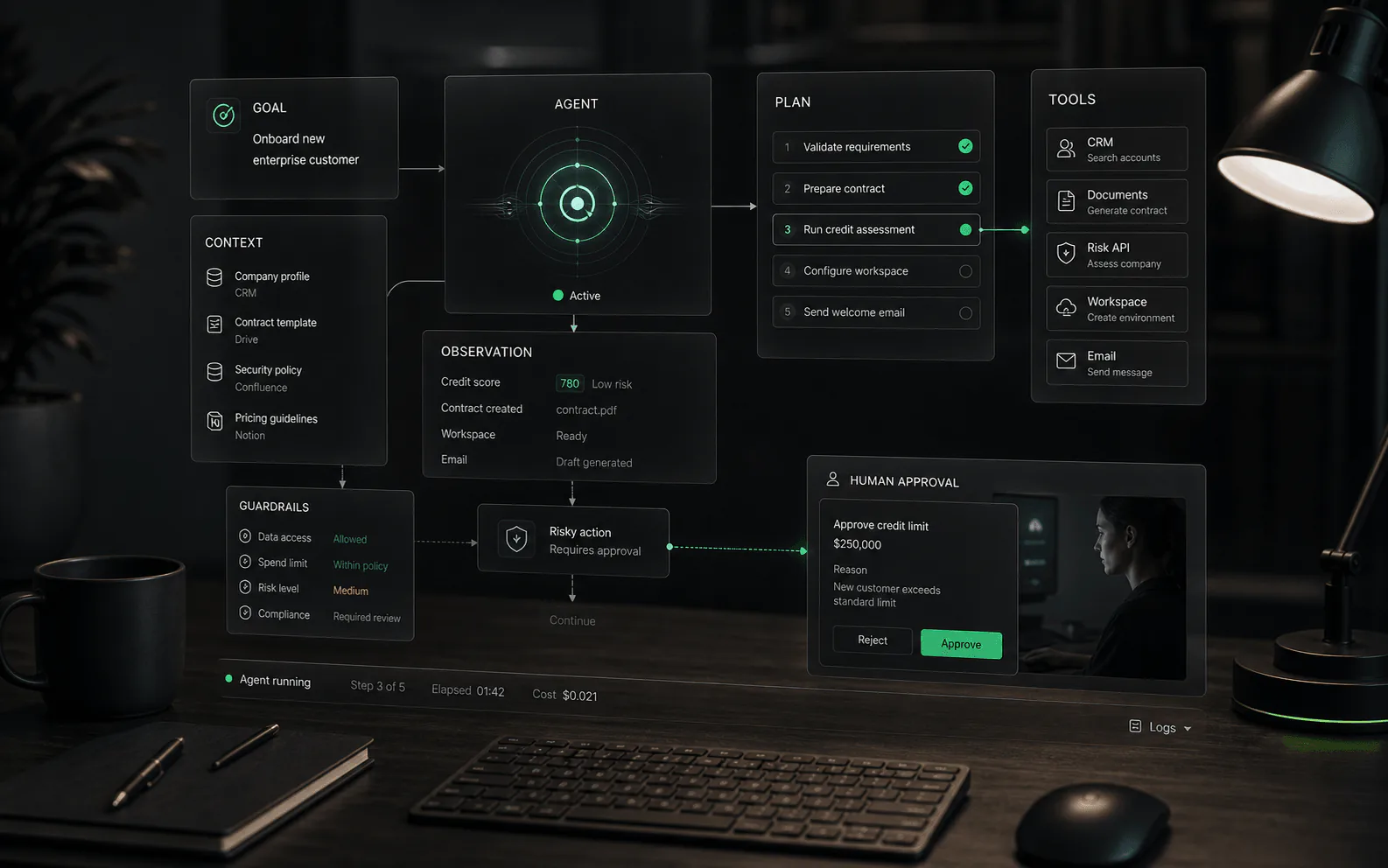
Human in the loop is a control pattern, not a vague reassurance. It defines where people stay involved in an AI workflow: before a response is sent, before an action is executed, when confidence is low, when a customer is upset, when policy risk appears, or when the agent reaches a task it is not allowed to complete.
How human-in-the-loop actually works
- Trigger: the workflow reaches a condition that requires human judgment, such as low confidence, high value, sensitive content, restricted action, angry customer language, or missing context.
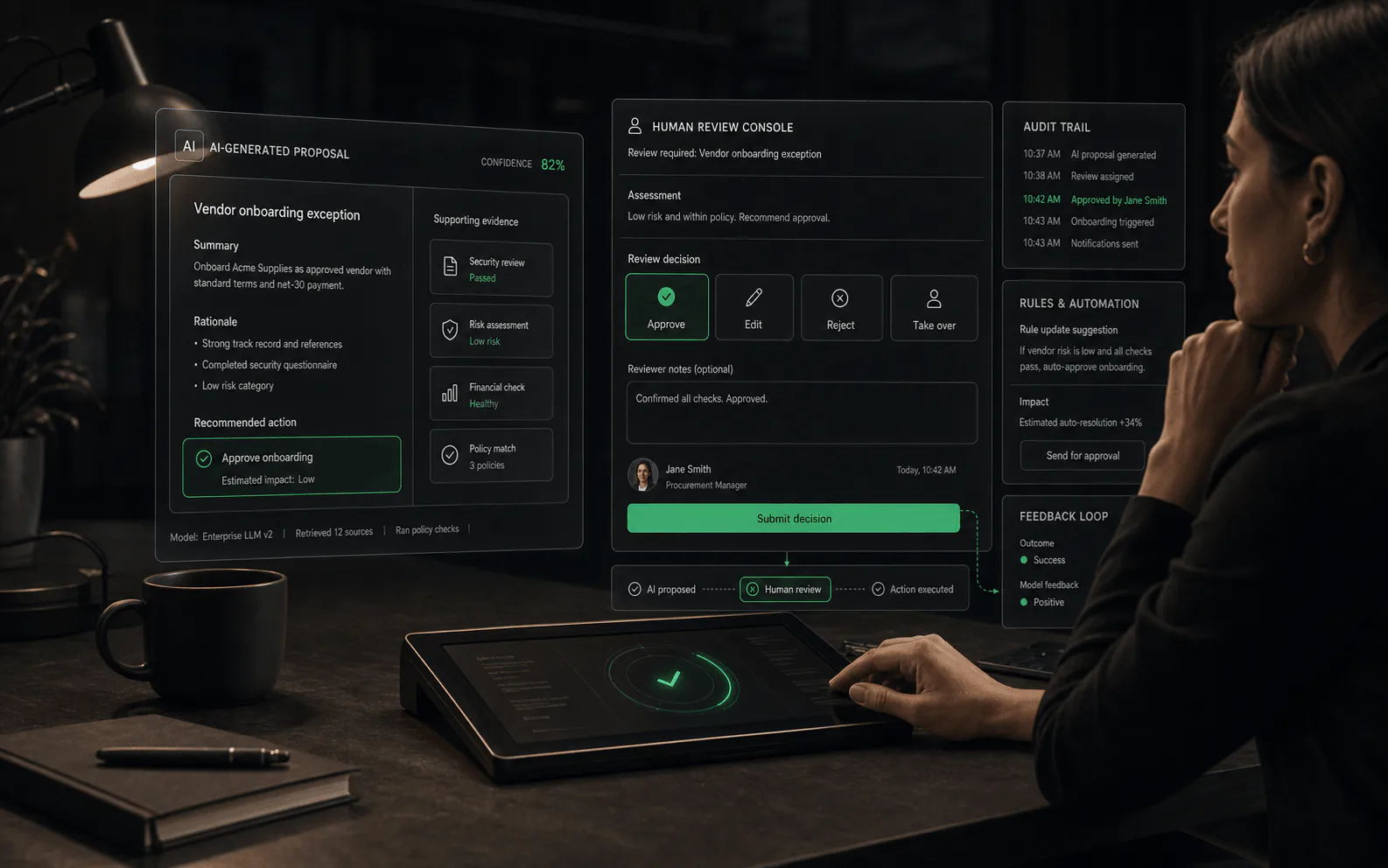
- Package: the system sends the reviewer enough context to decide: conversation history, retrieved sources, customer record, proposed answer, proposed action, and reason for escalation.
- Decision: the human approves, edits, rejects, reassigns, asks for more information, or takes over the conversation.
- Record: the system logs the agent proposal, human change, final decision, timestamp, and owner.
- Improve: teams review patterns in overrides and missed escalations to update sources, prompts, workflow rules, permissions, or reviewer training.
Common control models
- Review before send: the agent drafts a response, but a person approves or edits it before the customer sees it.
- Approval before action: the agent prepares an account update, refund, cancellation, or workflow step, but a person must approve execution.
- Exception routing: the agent handles routine cases but escalates low-confidence, sensitive, angry, or high-value interactions.
- Supervisor takeover: a person can enter the conversation or workflow with context preserved.
- Post-action audit: teams review completed conversations and actions to identify quality issues, but this is weaker than real-time control for risky workflows.
Human in the loop versus human on the loop
Human in the loop usually means a person is part of the decision path before an important outcome is completed. Human on the loop usually means a person monitors the system and can intervene, but the system may continue acting unless the person stops it. Buyers should ask which model a vendor means. For a refund, account change, or sensitive support answer, monitoring after the fact may not be enough.
Where it matters most
Human control matters most when the cost of a wrong answer is high. That includes refunds, billing disputes, account access, medical or legal-adjacent questions, contract terms, angry customers, VIP accounts, regulated language, irreversible actions, and any workflow where the agent could expose private data or make a customer-impacting change.
Concrete examples and non-examples
- Example: an agent drafts a refund recommendation, but a support lead must approve it before money is returned or account records change.
- Example: a customer asks for legal, medical, or contract-specific guidance, and the agent routes the conversation to a trained teammate instead of producing a confident answer.
- Example: a reviewer sees the retrieved sources, proposed response, previous conversation, and suggested next action before approving a customer-facing message.
- Non-example: a transcript is stored after the conversation ends, but no person can intervene before the answer or action reaches the customer.
- Non-example: a live chat transfer button exists, but the human receives no summary, source trail, attempted steps, or reason for escalation.
What buyers should verify
- Which events trigger human review, and can the business configure those triggers?
- Can reviewers edit, approve, reject, reassign, or take over, or can they only view a transcript?
- Does the handoff include customer context, source references, attempted steps, and the reason for escalation?
- Are approvals recorded with user, timestamp, changed content, and final action?
- Can different teams apply different review rules by workflow, channel, risk level, or customer segment?
- What happens to customer experience while the workflow waits for a person?
Demo tests for oversight quality
- Ask the agent to complete a sensitive action and confirm the approval gate appears before the action executes.
- Create an angry customer scenario and inspect what context the human receives during escalation.
- Ask for a reviewer to edit an agent answer and verify that the final audit trail shows the change.
- Delay reviewer response and see what the customer experiences while waiting.
- Review analytics for missed escalations, false escalations, reviewer load, and override patterns.
Tradeoffs to plan for
Human in the loop reduces risk but does not remove operational work. Review queues need staffing, prioritization, service-level expectations, and escalation ownership. If every conversation requires approval, automation may become slower than the original process. If almost nothing requires approval, the system may create risk under the appearance of control.
Queue design matters
A human review queue should not be a single pile of exceptions. It needs priority levels, ownership rules, routing by expertise, service-level expectations, and a way to distinguish customer urgency from internal QA. A billing dispute, security concern, VIP account, routine product question, and content-quality review should not compete blindly for the same reviewer attention.
Red flags
Be cautious when a vendor uses human in the loop to mean only a generic live chat transfer, a transcript after the fact, or a support inbox notification with no approval controls. The phrase should map to specific product behavior: trigger rules, reviewer actions, permissions, audit logs, and a clear customer experience during handoff.
Metrics to monitor
Useful metrics include review queue volume, average approval time, human override rate, missed escalation rate, false escalation rate, customer wait time during review, percentage of sensitive actions approved by role, and the number of incidents found during post-resolution QA. These metrics help reveal whether oversight is improving quality or simply adding friction.
Escalation design
Good human-in-the-loop design defines who receives the escalation, what context they see, what decision they can make, and what the customer experiences while waiting. It should also define priority rules: a refund approval, a security concern, a billing complaint, and a routine product question should not sit in the same undifferentiated queue. The goal is not to add a person everywhere; it is to place human judgment where it changes the outcome.
Ownership after launch
Human review needs an owner. Someone has to tune escalation rules, inspect overrides, train reviewers, manage queue load, and decide when an agent can move from mandatory review to sampled QA. Without ownership, teams often drift into two bad patterns: approving everything because the queue is overloaded, or escalating everything because nobody trusts the automation.
AI-assisted review
Not every human decision needs to start from scratch. Some platforms use AI to help reviewers work faster and more consistently: suggesting edits to agent responses, highlighting which parts of a source the agent relied on, flagging potential policy violations, or showing confidence indicators alongside the agent's proposed action.
This is different from the agent drafting a response. AI-assisted review means the human sees machine-generated suggestions after the agent has produced its output, but before the human makes a final decision. The goal is to reduce cognitive load and help reviewers spot issues faster, not to replace their judgment.
- Example: an agent proposes a refund. The review interface shows the refund amount, the policy section that applies, a confidence score, and a one-click "approve with standard message" option. The reviewer still decides, but they do not need to search for the policy or retype a common response.
- Example: an agent drafts a customer reply. The review interface highlights which sentences came from which knowledge base articles, so the reviewer can verify accuracy without re-reading the entire source.
- Example: the system flags that a proposed response contains pricing information that changed yesterday, prompting the reviewer to double-check before sending.
- Non-example: the agent proposes a response and the reviewer sees only a confidence percentage with no explanation of what drove that score or how to act on it.
Buyers should ask whether review assistance actually reduces decision time without introducing new risks. If suggestions are wrong often enough that reviewers ignore them, they become noise. If suggestions are right but reviewers approve them without reading, the system encourages rubber-stamping.
Questions to ask in demos:
- Can the reviewer see why a suggestion was made, or just the suggestion itself?
- How often do reviewers accept AI suggestions versus override them?
- Can the reviewer edit the suggestion before approving, or is it all-or-nothing?
- Do suggestions adapt based on past reviewer behavior, or are they static rules?
- What happens when a suggestion is wrong and the reviewer follows it anyway? Who is responsible?
Intelligent routing
Not every escalated case should go to the same queue. Intelligent routing uses signals from the conversation, customer profile, or agent behavior to decide which human should review or handle a case, and in some cases whether it needs human attention at all.
Routing decisions typically combine multiple signals: confidence thresholds from the model, customer tier or segment, topic classification, sentiment, detected intent, regulatory flags, and queue capacity. The goal is to match cases with reviewers who have the right expertise, availability, and authority, while avoiding bottlenecks where every exception lands in a single undifferentiated pile.
- Confidence thresholds: the agent estimates how confident it is in its proposed action. Below a configured threshold (say, 85 percent), the case routes to review. Above the threshold, it may proceed automatically, depending on the workflow.
- Probability-based escalation: instead of a hard rule, the system estimates the probability that the case will need human intervention based on past similar cases. This can surface borderline cases that a fixed threshold would miss.
- Adaptive handoff: the system learns from reviewer decisions over time. If reviewers consistently approve certain types of agent actions, the system can lower the escalation probability for similar future cases. If reviewers frequently override, the system can raise the threshold.
- Expertise routing: technical questions route to technical specialists, billing disputes to billing-trained reviewers, VIP accounts to senior staff, and regulated topics to compliance-approved reviewers.
Intelligent routing breaks down when signals are noisy, when thresholds are set without data, or when reviewers game the system by approving everything to clear their queue. Buyers should test routing with realistic edge cases: a customer who sounds angry but has a simple request, a technical question from a VIP account, a low-confidence response that is actually correct.
Questions to ask in demos:
- What signals does the routing model use, and can we adjust their weights?
- Can we set different thresholds for different workflows, customers, or risk levels?
- How does routing change as reviewers approve or override cases over time?
- Can we see the routing decision explained, or is it a black box?
- What happens when no reviewer is available in the routed queue?
Continuous learning from human corrections
Human-in-the-loop is not just a safety mechanism. It can also be a source of training data. When reviewers edit agent responses, override decisions, or provide feedback, the system can learn from those corrections to improve future performance.
Continuous learning from corrections means the platform captures what the human changed, analyzes patterns across many corrections, and uses those patterns to update prompts, retrieval sources, or model behavior. Over time, the agent should make fewer errors of the same type, reducing the volume of cases that need human attention.
- Example: reviewers consistently edit the agent's refund responses to add a policy explanation. The system identifies this pattern and updates the prompt to include policy context automatically. Future refund responses require fewer edits.
- Example: reviewers mark certain knowledge base articles as unhelpful or outdated. The platform reduces reliance on those sources or flags them for review, improving retrieval quality.
- Example: reviewers reject a specific type of action that the agent confidently proposes. The system learns to lower confidence or require approval for that action type going forward.
- Non-example: reviewers edit responses but the changes are not captured, analyzed, or fed back into the system. Each correction is a one-time fix, not a learning opportunity.
Buyers should understand how corrections flow back into the system. Is there a feedback loop, or do corrections disappear into a log? Can operations teams see aggregate patterns in corrections? Can they approve or reject proposed changes before they go live? How long does it take for a correction pattern to change agent behavior?
Continuous learning also raises governance questions. If a reviewer makes an error or applies a non-standard policy, should the system learn from that correction? Who validates that learning feedback is correct before it affects other cases?
Questions to ask in demos:
- How are human corrections captured and stored?
- Can we see aggregate patterns in corrections over time?
- How quickly do corrections affect agent behavior?
- Can we approve or reject proposed changes before they go live?
- What prevents incorrect reviewer feedback from degrading the system?
- Can we rollback changes if a learning update causes problems?
Reviewer quality and fatigue
Human reviewers are not interchangeable, and they are not robots. Their accuracy, speed, and consistency vary based on training, experience, workload, time of day, and emotional state. A human-in-the-loop system that ignores reviewer quality and fatigue will eventually degrade, even if the AI is well-designed.
Reviewer quality issues show up in several ways: inconsistent decisions between reviewers, drift over time as reviewers develop shortcuts, lower accuracy after long sessions, and variation between senior and junior staff. Some reviewers approve everything to clear their queue. Others escalate cautiously to avoid risk. Some read carefully; others skim.
Reviewer fatigue is especially important at scale. A reviewer who handles 200 cases a day will make different decisions in their first 50 cases versus their last 50. Time pressure, repetitive tasks, and difficult cases all contribute to burnout and quality decline.
- Example: a platform tracks reviewer agreement rates. When two reviewers handle similar cases, do they make the same decision? Low agreement suggests unclear guidelines or subjective judgments that need better standards.
- Example: a system detects that a reviewer's approval rate spiked from 70 percent to 95 percent in the last hour of their shift. This may indicate fatigue or corner-cutting, and the platform can flag it for quality review.
- Example: a routing system limits any single reviewer to 50 high-risk cases per day, distributing load to maintain quality. After 50 cases, additional items route to other available reviewers.
- Non-example: all reviewers are treated identically regardless of experience, and their decisions are never audited for consistency or quality.
Buyers should ask how the platform supports reviewer quality: calibration sessions, decision logs, QA sampling, agreement metrics, and workload limits. Does the system make it easy to see who is struggling and who needs more training?
Questions to ask in demos:
- Can we track reviewer agreement and consistency over time?
- Are there workload limits or fatigue indicators built into the system?
- Can we audit individual reviewer decisions and compare them to guidelines?
- How does the system handle reviewers who approve everything or escalate everything?
- Can senior reviewers mentor or override junior reviewers within the tool?
- What metrics show us when reviewer quality is degrading?
SLA design for human review
When an AI agent hands off to a human, the customer waits. Service-level agreements for human review define how long that wait should be, how delays are communicated, and what happens when targets are not met. Poor SLA design turns human-in-the-loop from a safety feature into a customer experience problem.
SLA targets depend on context. A billing dispute may warrant a four-hour response, while a routine product question might tolerate twenty-four hours. A VIP account may expect near-instant attention, while a free-tier user understands longer waits. An angry customer in a live chat needs response in minutes, while an email review queue can operate on hours.
Effective SLA design answers several questions:
- What is the target response time for each priority level?
- How is priority determined: by customer tier, by issue type, by detected risk, by channel?
- What happens when the target is missed: does the customer receive an update, does the case escalate, does a manager get notified?
- Can SLA targets be adjusted by time of day, day of week, or staffing level?
- How is wait time communicated to the customer during review?
Queue prioritization matters. A first-in-first-out queue treats a refund request the same as a product question, even though the refund has higher stakes. Priority queues route urgent cases faster, but they can starve lower-priority items if not managed. Some platforms use weighted queuing, aging rules that increase priority over time, or escalation when wait exceeds a threshold.
- Example: a platform offers three SLA tiers: critical (15-minute response), high (2 hours), and normal (24 hours). Critical cases include security concerns, angry VIPs, and regulatory issues. High cases include billing disputes and account changes. Normal cases include routine questions and feedback.
- Example: when a case sits in queue for longer than half its SLA target, the system notifies a supervisor and offers the option to reassign or expedite.
- Example: a customer in a live chat sees a wait-time estimate and a position-in-queue message while their case waits for reviewer approval. If the wait exceeds five minutes, the system offers to continue via email instead.
- Non-example: all cases enter the same queue with no prioritization, no SLA targets, no visibility into wait time, and no communication to the customer about delays.
SLA design also connects to staffing. If a queue consistently misses targets, the platform should surface that as a capacity problem, not hide it. Reviewer dashboards should show queue depth, average wait time, and SLA breach risk so staffing decisions can be made proactively.
Questions to ask in demos:
- Can we configure different SLA targets by priority, customer segment, or issue type?
- How are SLA breaches detected and communicated?
- Can we see queue wait times and SLA risk in reviewer dashboards?
- What does the customer experience while waiting for review?
- Can the system automatically escalate or notify supervisors when SLAs are at risk?
- How does the platform handle SLAs across channels: chat, email, messaging?
Sources to verify
Use these references to understand the term and pressure-test vendor claims. Product-specific details still need to be verified against current vendor materials.
FAQ
Common questions
Is human in the loop the same as human handoff?
Not exactly. Handoff usually means transferring a conversation to a person. Human in the loop can also include approval gates, review queues, exception handling, and human control before an automated action is completed.
Does human in the loop make an AI agent safe?
It helps manage risk, but it is not a complete safety system. Buyers should still evaluate permissions, testing, audit logs, fallback behavior, and how often human review is actually triggered.
When should human review be mandatory?
Mandatory review is most useful for irreversible actions, sensitive customer issues, account changes, refunds, billing disputes, low-confidence answers, and workflows where policy or compliance risk is meaningful.
What is the difference between human in the loop and human on the loop?
Human in the loop usually means a person is part of the decision path before a response or action is completed. Human on the loop usually means a person monitors the system and can intervene, but the system may continue unless stopped. For sensitive workflows, buyers should ask whether humans can change the outcome before it reaches the customer or system of record.
What should a human reviewer see before approving an AI agent action?
A reviewer should see the conversation history, customer or account context, retrieved sources, the agent's proposed response or action, the reason the case was escalated, and any relevant risk flags. If the reviewer only sees a transcript with no source trail or proposed action, approval can become guesswork rather than meaningful oversight.
Can human in the loop slow down support?
Yes. Human review can create queues, delays, and staffing requirements if every low-risk case needs approval. The goal is to place review where judgment changes the outcome: sensitive actions, low-confidence answers, VIP customers, angry customers, billing disputes, or irreversible changes. Good queue design keeps routine work moving while protecting high-risk cases.
How do you measure human-in-the-loop quality?
Useful measures include review queue volume, average approval time, override rate, missed escalation rate, false escalation rate, customer wait time, reviewer agreement, incidents found in QA, and how often review feedback improves prompts, sources, or workflow rules. These metrics show whether oversight is improving outcomes or only adding friction.
What are common human-in-the-loop failure modes?
Common failures include rubber-stamp approvals, overloaded review queues, unclear ownership, reviewers without enough context, escalation rules that are too broad or too narrow, and post-action logging presented as real-time control. Buyers should test the review path with realistic edge cases before trusting it in production.
Who should own human-in-the-loop workflows?
Ownership usually needs to be shared. Operations or support leaders should own workflow quality and review rules, while IT or security teams own permissions, logging, and system access. The key is naming who can change escalation thresholds, pause automation, train reviewers, and decide when a workflow moves from mandatory approval to sampled QA.
What is AI-assisted review and does it help or hurt oversight?
AI-assisted review means the platform suggests edits, highlights source relevance, or shows confidence indicators to help reviewers work faster. It helps when suggestions reduce cognitive load without encouraging rubber-stamping. If reviewers approve AI suggestions without reading, or if suggestions are frequently wrong and become noise, the feature can degrade oversight. Buyers should test whether suggestions explain their reasoning and track how often reviewers accept versus override them.
How does intelligent routing work for human review?
Intelligent routing uses signals like confidence thresholds, customer tier, topic classification, and sentiment to decide which human should handle a case and whether it needs human attention. The goal is to match cases with reviewers who have the right expertise, availability, and authority. Buyers should ask what signals drive routing decisions, whether thresholds are adjustable, and how routing adapts based on reviewer behavior over time.
Do human corrections improve the AI agent over time?
They can, if the platform has a feedback loop. Continuous learning from corrections means the system captures reviewer edits, analyzes patterns, and updates prompts, sources, or behavior. Without a feedback loop, corrections are one-time fixes that disappear into a log. Buyers should ask how corrections flow back into the system, whether teams can see aggregate patterns, and whether proposed changes require approval before going live.
How do you prevent reviewer fatigue from degrading quality?
Reviewer fatigue shows up as inconsistent decisions, increased approval rates, and quality decline after long sessions. Platforms can help by tracking reviewer agreement metrics, setting workload limits, detecting approval-rate spikes that indicate corner-cutting, and distributing high-risk cases across reviewers. Buyers should ask whether the platform shows quality metrics per reviewer and whether it supports calibration, QA sampling, and workload limits.
What SLA targets should we set for human review?
SLA targets depend on context: channel, customer tier, issue type, and risk level. A billing dispute may warrant a two-hour response, while a routine question might tolerate twenty-four hours. Effective SLA design includes priority levels, queue aging rules, breach notifications, and customer communication during wait. Buyers should ask whether the platform supports configurable SLAs by segment, shows SLA risk in reviewer dashboards, and handles breaches gracefully.