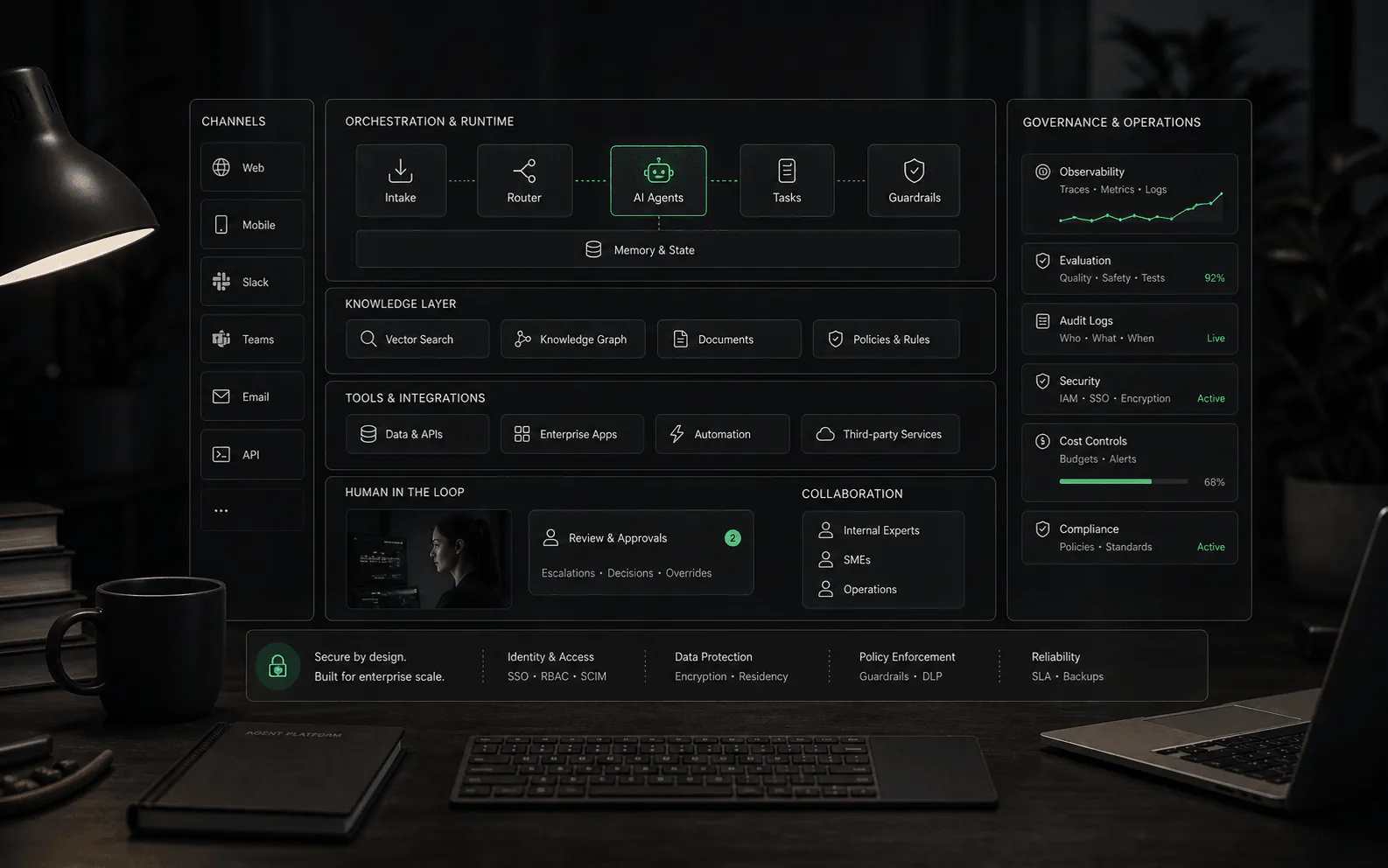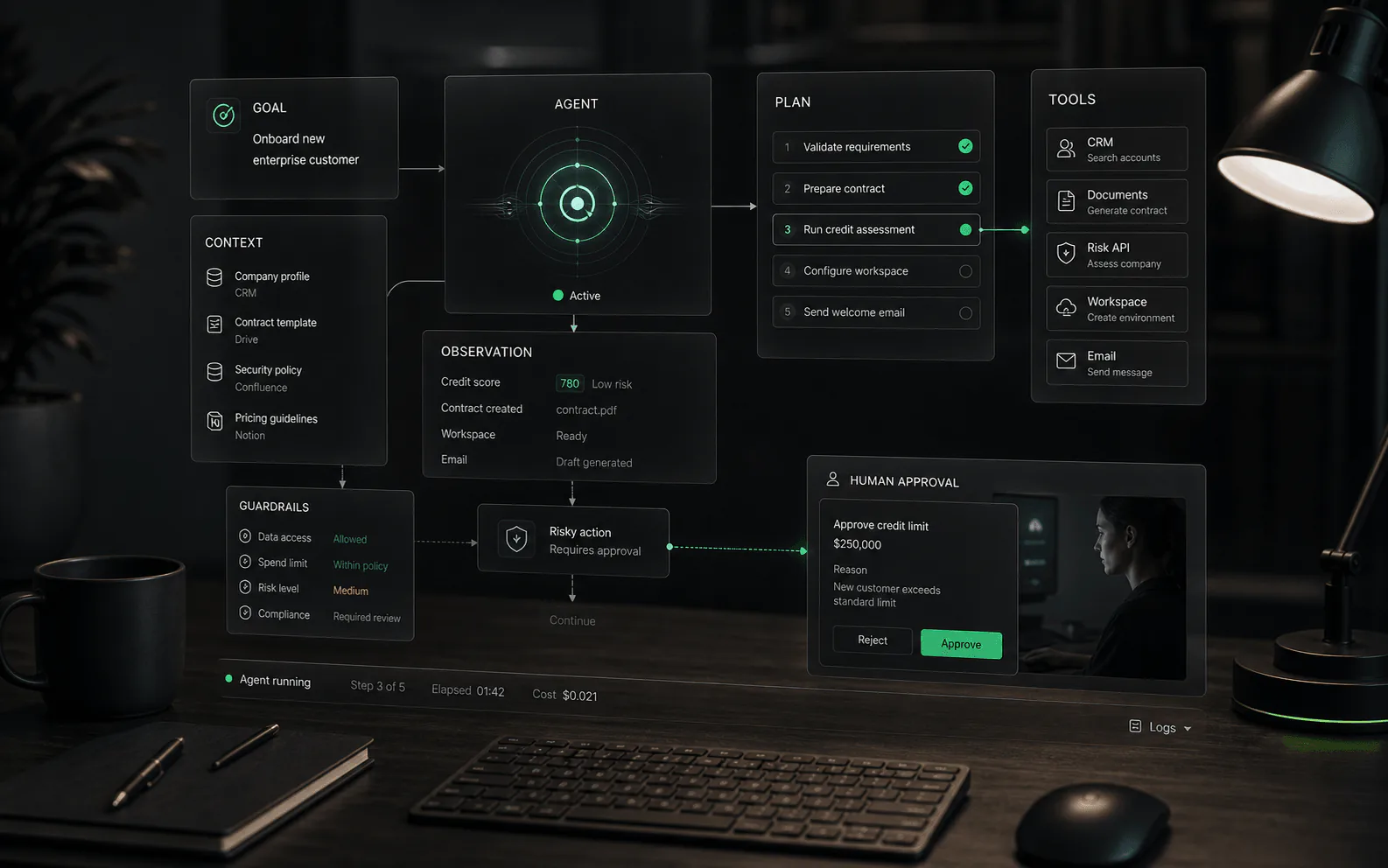
What the term means in practice
For business buyers, an AI agent is not just a chat window with a newer label. It is a system that can understand intent, retrieve relevant business context, decide the next permitted step, and either respond, route, draft, update, trigger, or escalate. The useful definition depends on the workflow boundary: what the agent may do by itself, what requires approval, and what must move to a human.
How it differs from a chatbot
- A basic chatbot usually follows a conversation pattern: answer a question, collect a lead, or point someone to a page.
- An AI agent may use business knowledge, customer context, permissions, and connected tools to progress a task.
- The distinction is not the word agent. The distinction is whether the system can reason over context, take bounded action, preserve state, and escalate with useful handoff context.
- A product can call itself an agent and still behave like a simple chatbot if it cannot use reliable knowledge, trigger approved workflows, or expose review controls.
How an AI agent works
- Interpret: the system turns a request into an intent, task, or goal. In a business workflow, that might mean identifying whether a customer needs troubleshooting, order help, billing review, or escalation.
- Ground: the agent retrieves or receives context from approved sources such as help content, policies, account data, order records, previous tickets, or internal process notes.
- Plan: the agent decides the next permitted step. A simple case may need one answer; a complex case may require gathering details, checking a record, drafting a response, and routing to a human.
- Act: the agent may answer, classify, summarize, tag, route, draft, update a record, call a tool, or request approval depending on its permissions.
- Observe: the system records what happened, watches for failure or low confidence, and gives humans enough information to audit, improve, or take over the workflow.
Agent types taxonomy
Not all AI agents are built the same. Understanding the taxonomy helps buyers match the right type to the right job.
- Conversational agents focus on dialogue: answering questions, clarifying requests, and guiding users through a decision tree. They excel at front-line support, qualification, and triage. The key evaluation question is whether the agent maintains context across turns, handles ambiguity gracefully, and escalates when the conversation exceeds its knowledge boundary.
- Workflow agents focus on task execution: following a defined process, checking conditions, updating systems, and completing multi-step work. They excel at operations like order processing, return authorization, account changes, and data synchronization. The key evaluation question is whether the agent follows the workflow reliably, handles edge cases, logs each step, and fails gracefully when something goes wrong.
- Multi-agent systems combine multiple agents that may specialize by function, data access, or skill. One agent might handle customer identification, another policy retrieval, another action execution, and another quality review. The key evaluation question is how agents coordinate, whether handoffs preserve context, how failures propagate, and who monitors the overall system.
Many platforms blur these boundaries. A conversational agent may trigger workflows. A workflow agent may include conversational steps. What matters is understanding the primary job, then evaluating whether the platform's architecture supports that job with appropriate controls.
Autonomy is a spectrum
The most important buying question is not whether the agent is autonomous. It is where autonomy starts and stops. A read-only agent that answers from public documentation carries different risk from an agent that changes account status, issues refunds, updates a CRM, or sends messages on behalf of a human. Buyers should ask vendors to map autonomy by workflow step: which steps are automatic, which require approval, which trigger escalation, and which are blocked entirely.
Multi-agent orchestration
When a workflow exceeds what a single agent can handle reliably, platforms may use multiple agents that coordinate. Understanding orchestration patterns is essential for evaluating complex automation claims.
Coordination models: Agents may coordinate through a central orchestrator that routes tasks and aggregates results, or through peer-to-peer handoffs where each agent passes context to the next. Central orchestration offers more visibility and control; peer handoffs can be faster but harder to debug. Ask vendors which model they use and how failures are handled.
Handoff quality: When one agent hands off to another, the receiving agent should have enough context to continue without repeating questions. This requires shared memory, structured conversation state, or explicit context passing. A weak handoff feels like starting over; a strong handoff is invisible to the end user.
Shared state: Multi-agent systems need a way to share information: customer context, conversation history, decisions made, actions taken, and current workflow status. This shared state should be queryable, auditable, and visible to human reviewers. Without it, each agent operates in isolation and the overall workflow becomes fragile.
Conflict resolution: When agents disagree or produce conflicting outputs, the platform needs a resolution mechanism. This could be a supervisory agent, a rules-based arbiter, a human escalation path, or a confidence-weighted selection. Ask vendors what happens when two agents give different answers or recommendations.
Failure propagation: If one agent in a chain fails, the downstream agents need to know. Failure handling includes retry logic, fallback paths, graceful degradation, and human notification. A robust multi-agent system isolates failures and prevents cascade collapse.
Where AI agents create value
AI agents are most useful when the work is repeatable but not perfectly scripted. In customer support, that can mean diagnosing an issue, finding the right policy, summarizing history, and routing to the right queue. In ecommerce, it can mean answering order questions, triaging return issues, or gathering the details needed for a human to approve a refund. In sales and operations, it can mean qualifying requests, preparing drafts, updating records, or initiating a workflow after the required checks pass.
Industry vertical examples
AI agent requirements vary significantly by industry. What works for an ecommerce storefront may fail in healthcare or financial services. Buyers should evaluate platforms against the constraints of their specific vertical.
Healthcare: Agents handling patient inquiries must navigate HIPAA and similar regulations. Key considerations include: data residency and access controls, audit logging for PHI exposure, consent management, integration with electronic health records, and clear escalation paths for clinical judgment. An agent that schedules appointments or sends reminders may be acceptable; an agent that interprets symptoms or recommends treatment crosses into regulated territory. Ask vendors for documented HIPAA compliance, business associate agreements, and specific guardrails around clinical content.
Fintech and financial services: Agents handling financial inquiries face regulatory scrutiny around advice, transaction authorization, fraud detection, and audit trails. Key considerations include: role-based access controls for sensitive data, transaction limits and approval workflows, compliance logging for regulatory review, integration with core banking and payment systems, and clear separation between informational responses and financial advice. An agent that explains a fee schedule is different from an agent that recommends investment products. Ask vendors about their compliance certifications, audit capabilities, and how they handle regulated advice boundaries.
B2B SaaS: Agents in B2B contexts often need deep integration with product functionality, customer data, and internal workflows. Key considerations include: multi-tenant data isolation, role-aware responses based on customer tier and permissions, integration depth with CRM, billing, and support systems, ability to handle complex technical workflows, and escalation paths that preserve customer context. B2B buyers should test agents against real customer scenarios, not generic support scripts.
Retail and ecommerce: Agents face high volume, seasonal spikes, and customer expectations for fast resolution. Key considerations include: integration with order management, inventory, and shipping systems, handling of returns, refunds, and exchanges within policy bounds, personalization based on purchase history without privacy overreach, and clear handoff to human agents for complex issues like damaged goods or fraud claims. The agent should handle routine questions at scale while protecting margins and brand reputation.
Tool calling depth
Modern AI agents don't just generate text - they can call functions, invoke APIs, and trigger actions in connected systems. Understanding tool calling patterns is essential for evaluating platform capability and security.
Function calling patterns: At a basic level, agents call tools to retrieve information: looking up an order status, searching a knowledge base, fetching account details. At intermediate levels, agents may update records, create tickets, send notifications, or trigger workflows. At advanced levels, agents may chain multiple tool calls, make decisions based on intermediate results, and execute multi-step transactions. Ask vendors what levels of tool calling are supported and what limits apply.
API integration: Agents need to connect to business systems: helpdesks, CRMs, ERPs, payment processors, shipping providers, internal APIs. The integration question is not just whether the platform has connectors, but how those connectors are configured, authenticated, monitored, and updated. Point-and-click integrations are easier to deploy but may lack flexibility; custom integrations offer control but require development resources.
Permission boundaries: Every tool call should operate within defined permissions. The agent should not have blanket access to all customer data or all system functions. Permissions should be scoped by role, by customer, by data type, and by action. Ask vendors how permissions are configured, how they are enforced at runtime, and what prevents an agent from calling an unauthorized endpoint - even if the agent reasons it should.
Error handling: Tool calls fail. APIs return errors, rate limits are hit, systems go down, data is missing. A robust agent handles these failures gracefully: retrying with backoff, falling back to alternative tools, escalating to humans, or informing the user clearly. Ask vendors to demonstrate failure scenarios and show how the agent responds.
Observability: Every tool call should be logged: what was called, with what parameters, what was returned, and how the agent used that result. This observability is essential for debugging, auditing, compliance, and optimization. Ask vendors how tool call logs are stored, how long they are retained, who can access them, and how they are presented for review.
What buyers should evaluate
- Knowledge grounding: Which sources does the agent use, how fresh are they, and can it show why an answer was chosen?
- Action permissions: What can the agent read, write, update, trigger, or submit without approval?
- Workflow limits: Which tasks are explicitly out of scope, and how does the agent behave when confidence is low?
- Human handoff: Can a person take over with conversation history, customer context, and the agent's attempted reasoning intact?
- Auditability: Can the team review answers, actions, escalations, and failures after the fact?
- Ongoing improvement: Does the platform show unanswered intents, stale content, poor handoffs, and repeated failure patterns?
Demo questions that reveal depth
- Show the agent handling a real customer question that requires policy context, not a generic FAQ answer.
- Show what happens when the source material conflicts or is missing.
- Show which actions require approval and which actions the agent can complete by itself.
- Show the handoff transcript a human receives after escalation.
- Show how the team reviews bad answers and improves the knowledge base or workflow rules.
Evaluation tests before launch
- Historical case test: run real past conversations through the agent and compare the proposed answer, routing, and handoff against what a strong human operator would have done.
- Missing context test: remove the required source or make the customer request ambiguous, then verify that the agent asks for clarification or escalates instead of inventing a confident answer.
- Permission test: ask the agent to perform an action it should not be allowed to complete, such as issuing a refund, changing account details, or revealing restricted information.
- System failure test: disconnect or degrade a tool the agent depends on and verify that the user experience, logs, and escalation path remain clear.
- Regression test: after changing prompts, workflow rules, or knowledge sources, rerun a fixed evaluation set to make sure older behavior did not quietly break.
Model considerations
The underlying AI model shapes agent behavior, cost, latency, and capability. Buyers should understand how model choice impacts their deployment and what trade-offs each option involves.
Model selection: Some platforms offer a single model; others let you choose. Larger models (GPT-4, Claude 3 Opus) offer better reasoning, instruction following, and nuance but cost more and respond slower. Smaller models (GPT-4o-mini, Claude Haiku) are faster and cheaper but may struggle with complex reasoning or edge cases. Specialized models may be fine-tuned for specific domains or tasks. Ask vendors what models are available, how selection works, and whether you can mix models for different use cases.
Behavior differences: Models vary in how they follow instructions, handle ambiguity, refuse unsafe requests, and structure outputs. The same prompt on different models may produce different results. When evaluating platforms, test with the models you plan to use in production. A demo that works on one model may behave differently on another.
Cost structure: AI agents consume tokens for every input, output, and tool call. Multi-turn conversations, RAG retrieval, and tool calling can multiply costs quickly. Ask vendors for clear pricing on: input tokens, output tokens, tool calls, retrieval operations, and any fixed platform fees. Understand how costs scale with usage and what controls exist to limit runaway spending.
Latency: Model response time directly impacts user experience. Complex reasoning, large context windows, and multiple tool calls all add latency. Ask vendors for typical response times under realistic load, how the platform handles timeouts, and whether caching or streaming improves perceived performance.
Model updates: AI models are updated regularly. New versions may behave differently than old ones. Ask vendors how they handle model versioning, whether you can pin to specific model versions, and how they communicate breaking changes. A sudden model change can disrupt agent behavior in production.
Fine-tuning and custom models: Some platforms offer fine-tuning or custom model training on your data. This can improve performance for specific domains or workflows but adds complexity, cost, and maintenance. Fine-tuned models require ongoing updates as your knowledge base evolves. Ask vendors what fine-tuning options exist, what data is required, and how updates are managed.
Metrics that matter
Useful AI agent metrics measure completed work, not just conversation volume. Track task completion rate, correct escalation rate, answer accuracy on reviewed samples, human override rate, tool-call failure rate, time to resolution, cost per completed workflow, repeated failure topics, and customer satisfaction after agent-assisted interactions. Be careful with deflection as a standalone metric; an avoided human conversation is not a win if the answer was wrong, incomplete, or frustrating.
Concrete examples and non-examples
- Example: a support agent identifies a billing question, retrieves the current policy, checks the account tier, drafts a response, and escalates for approval because the customer is disputing a charge.
- Example: an ecommerce agent gathers order number, shipping status, return reason, and product condition before routing the case to the right team with the required context already attached.
- Non-example: a pop-up that answers three scripted questions from a static FAQ but cannot use customer context, tools, escalation rules, or post-conversation review.
- Non-example: a workflow automation rule that routes tickets based only on keywords. It may be useful automation, but it is not an AI agent unless it interprets context and operates inside defined reasoning and permission boundaries.
Common red flags
Be cautious when an agent demo depends on polished sample data, avoids edge cases, or cannot explain source use and action permissions. Other warning signs include vague claims about autonomy, no clear escalation path, no audit trail, and pricing that changes materially once real conversation volume, seats, channels, or workflow actions are included.
Related concepts
AI agents sit between several adjacent ideas: chatbots, copilots, workflow automation, RAG, tool calling, and human-in-the-loop review. The safest evaluation approach is to define the job first, then decide which combination of conversation, retrieval, tools, approvals, analytics, and human escalation is required. That keeps the buying process grounded in operating reality instead of vendor terminology.
Launch readiness
A production AI agent should launch with a test set, a rollback plan, named owners, review thresholds, and a known fallback path. Buyers should ask who watches the first week of conversations, how defects are triaged, how quickly bad answers can be corrected, and which metrics decide whether the agent expands or pauses. Without that operating plan, even a promising demo can become fragile in real customer traffic.
What strong content should make clear
A serious AI agent page should leave the reader with a usable operating model: define the job, define the data, define the tools, define permissions, define the human boundary, define tests, and define the review loop. If a vendor cannot explain those layers, the buyer is not evaluating an agent system; they are evaluating a demo.
Sources to verify
Use these references to understand the term and pressure-test vendor claims. Product-specific details still need to be verified against current vendor materials.
FAQ
Common questions
Is an AI agent the same as a chatbot?
Not always. A chatbot usually stays inside a conversation. An AI agent may also consult business knowledge, use connected tools, take approved actions, and escalate with context.
What makes an AI agent safer to use in business workflows?
Defined permissions, reliable knowledge sources, human handoff, action logs, testing, and clear limits on what the agent can do without approval.
Can an AI agent replace a support team?
It should not be evaluated that way. A better question is which repeatable work the agent can handle, where humans should stay in control, and whether the system improves response quality without creating hidden risk.
What is the difference between an AI agent and an AI assistant?
An AI assistant usually helps a person complete work by answering, drafting, summarizing, or suggesting next steps. An AI agent may go further by following a workflow, using tools, preserving context, and taking permitted actions inside defined boundaries. The difference is not always clean, so buyers should ask what the system can read, write, trigger, approve, and escalate rather than relying on the label.
What is an example of an AI agent in customer support?
A practical support agent might identify a customer's issue, retrieve the relevant policy, check order or account context, draft a response, tag the conversation, and escalate when the case needs human judgment. The important part is not that the agent writes a message; it is that it moves a bounded support workflow forward while preserving enough context for review.
What are the different types of AI agents?
The main types are conversational agents (dialogue-focused for support, triage, and guidance), workflow agents (task execution-focused for operations like order processing and account changes), and multi-agent systems (multiple coordinated agents for complex workflows). Many platforms combine these types. What matters is matching the agent architecture to the job requirements.
How do multiple AI agents work together?
Multi-agent systems coordinate through central orchestration or peer-to-peer handoffs. They share context through a common state, pass structured information between agents, and need conflict resolution when outputs disagree. Key evaluation questions include: how handoffs preserve context, how failures propagate, who monitors the overall system, and how conflicts are resolved.
What should I ask about tool calling and integrations?
Ask what function calling levels are supported (read-only, write, transactional), how API integrations are configured and authenticated, what permission boundaries exist for each tool, how errors and rate limits are handled, and how every tool call is logged and audited. Tool calling without proper permissions and monitoring creates operational and security risk.
How do industry requirements affect AI agent choice?
Healthcare requires HIPAA compliance, PHI controls, and clear clinical boundaries. Fintech requires audit trails, regulatory compliance, and advice boundaries. B2B SaaS requires multi-tenant isolation, deep integrations, and role-aware responses. Retail requires high-volume handling, integration with order systems, and brand consistency. Evaluate platforms against your specific vertical constraints, not generic benchmarks.
How does model choice impact AI agent performance?
Larger models offer better reasoning but cost more and respond slower. Smaller models are faster and cheaper but may struggle with complexity. Model behavior varies: the same prompt produces different results across models. Cost accumulates through input tokens, output tokens, and tool calls. Latency affects user experience. Ask vendors about model options, pricing transparency, latency under load, and how model updates are handled.
How autonomous should an AI agent be?
Autonomy should match the risk of the workflow. Low-risk tasks such as summarizing a conversation or suggesting a help article may need lighter controls. Customer-impacting actions such as refunds, account changes, billing decisions, or public replies should have stronger permissions, approval gates, audit logs, and fallback rules.
What should buyers ask in an AI agent demo?
Ask the vendor to run real historical examples, not only polished sample prompts. The demo should show source retrieval, tool permissions, what happens when context is missing, how the agent escalates, what humans see during handoff, how actions are logged, and how bad answers are corrected after launch.
What are the biggest risks of AI agents?
The biggest risks are usually operational: stale knowledge, overbroad tool permissions, weak escalation, hidden costs from long multi-step workflows, poor testing, unclear ownership, and metrics that reward deflection instead of correct outcomes. Buyers should evaluate the operating model around the agent as carefully as the model output.
How do you measure whether an AI agent is working?
Useful measures include task completion rate, correct escalation rate, reviewed answer accuracy, tool-call failure rate, human override rate, time to resolution, repeated failure topics, and customer satisfaction after agent-assisted conversations. Conversation volume alone is not enough because a high-volume agent can still create bad outcomes.