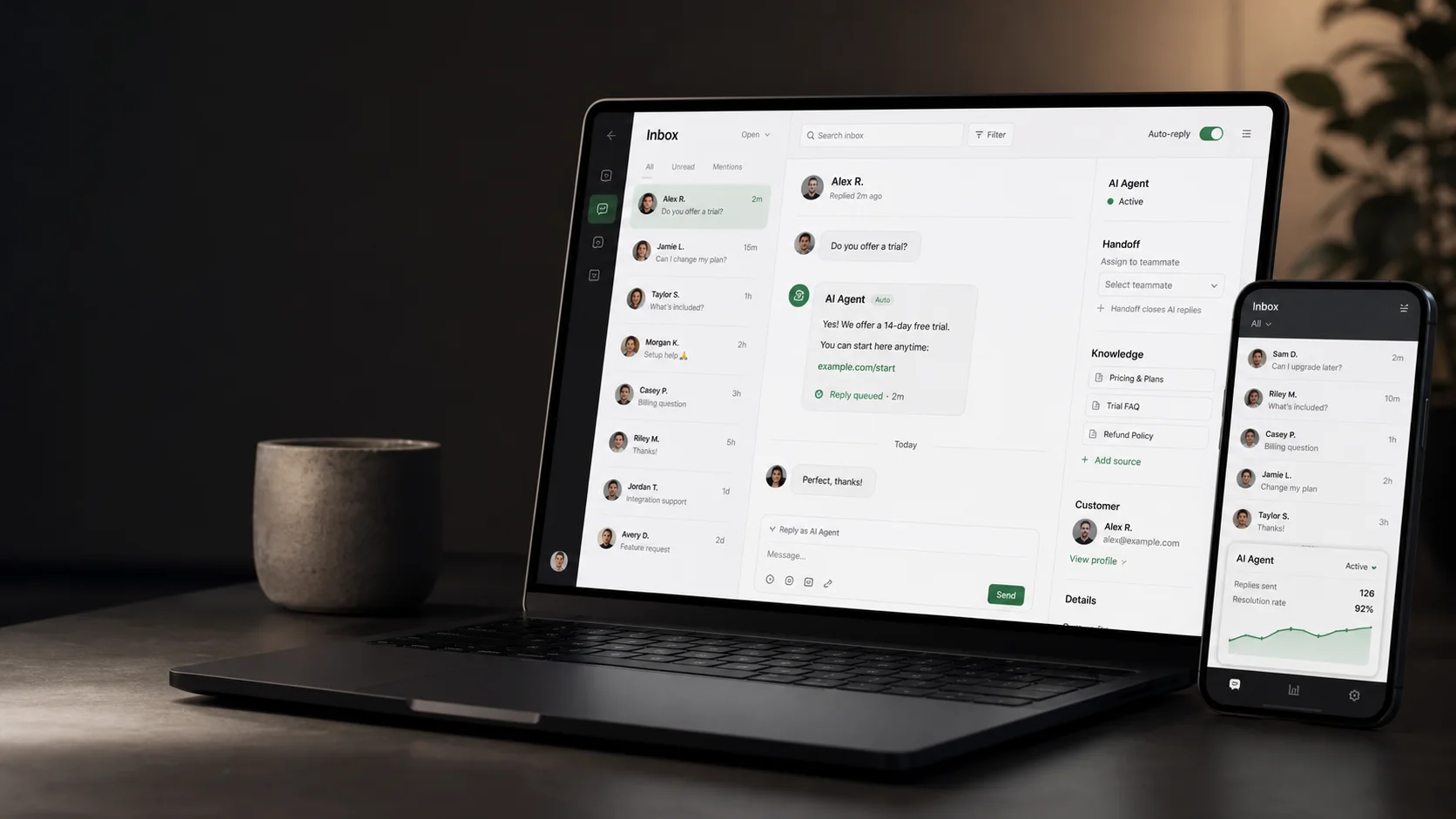
Connect YourGPT to Instagram DMs for support and lead capture in 2026. Get the free, Meta-approved, step-by-step setup checklist and handoff playbook.
Bottom line: a YourGPT Instagram agent can deflect repetitive DMs and capture leads 24/7, but only if you train it on real products, set escalation rules, and keep human handoff simple.
Add an Instagram AI agent only after the account, permissions, knowledge base, and handoff path are ready. YourGPT can connect the agent through Meta-approved messaging so routine inbound DMs get answered with your product and policy context while refunds, complaints, private account questions, and high-value sales move to a person.
Start narrow:
automate the questions your team already answers every day;
review real transcripts every week;
expand only after the agent proves it can respond accurately without guessing.
That discipline matters. An Instagram AI agent is not just "ChatGPT in DMs." A reliable setup needs an Instagram Professional account, a Facebook Page connection, Meta app permissions, webhooks, an access token, a trained knowledge base, escalation rules, and a way for a human to take over when the conversation becomes sensitive or high-value.
At a high level, the setup has seven moving pieces. Treat these as the launch path before you start tuning tone, prompts, or sales flows:
Create or confirm your Instagram Business or Creator account.
Make sure it is connected to a Facebook Page you control.
Create a YourGPT AI agent and train it on your website, FAQs, product details, policies, and lead questions.
Connect the Instagram integration in YourGPT.
Add the required Meta details such as App ID, App Secret, Page ID, and access token where your setup requires them.
Test real Instagram DM scenarios before enabling automation.
Turn on AI replies only for the questions you trust the agent to answer, and route everything else to a human.
What an Instagram AI agent can do
An Instagram AI agent can answer repetitive DMs, qualify leads, recommend products, collect context before a human joins, route support questions, and keep conversations moving when your team is offline. For many businesses, that means fewer missed leads from Reels, Stories, profile visits, and product posts.
The best use cases are not vague "automation" tasks. They are high-frequency inbox moments where the customer has already shown intent and your team already has an approved answer:
answering product, pricing, sizing, availability, shipping, and return questions;
asking lead qualification questions before booking a demo or consultation;
sending the right help article, product page, or checkout link;
replying to common support issues with consistent policy-approved language;
escalating refund, complaint, billing, medical, legal, or high-intent sales conversations to a human;
keeping Instagram conversations in the same operational view as web chat, WhatsApp, and other support channels.
YourGPT is a good fit for this because it is built as a no-code AI agent platform rather than a single-channel autoresponder. The goal is not to blast automated messages. The goal is to make Instagram DMs useful as a customer support, sales, and lead-capture channel.
What you need before you connect Instagram
Before you build the agent, get the account layer right. Most broken Instagram chatbot setups fail here, not in the AI model.
This is the practical checklist to prepare before connecting YourGPT to Instagram:
Instagram Professional account: Use a Business or Creator account. Meta's messaging APIs are built around professional account workflows, not personal-account automation.
Connected Facebook Page: Confirm the Instagram account is linked to the correct Facebook Page you control.
Meta Developer App: Use the app to manage permissions, webhooks, tokens, and the integration connection.
instagram_manage_messages access: This permission is central for managing Instagram messages through the approved API path.
Webhooks: Make sure new message and event notifications can reach the integration.
Access token: Use the token to authorize the Page, Instagram account, and integration connection.
YourGPT workspace: Create the agent, train it on business knowledge, connect Instagram, and manage human handoff from one place.
YourGPT's Instagram documentation lists the practical prerequisites clearly: a Meta Developer App, admin or developer role for the Facebook Page, and an Instagram Professional Account. The same setup flow asks for connection details such as App ID, App Secret, Page ID, and Access Token when configuring the Instagram channel.
Step-by-step: add an AI agent to Instagram with YourGPT
Once the account and Meta access pieces are ready, the rest of the work is about building a reliable operating system: train the agent, connect Instagram, test real DMs, and decide when the AI should stay quiet.
1. Create your YourGPT AI agent
Start in YourGPT by creating a workspace and a new chatbot or AI agent. Give it a narrow job first:
Answer Instagram DMs about products, pricing, shipping, returns, and lead questions.
Ask a follow-up question when the customer intent is unclear.
Hand off the thread when the topic needs human judgment.
A narrow first launch is easier to test than a bot that tries to handle every possible customer conversation.
Add the training sources that your team would normally use to answer a customer accurately:
website pages and product pages;
help center or FAQ articles;
shipping, refund, warranty, and cancellation policies;
pricing and plan information;
brand voice examples;
lead qualification questions;
escalation rules for human handoff.
Do not skip the policies. Instagram DMs often include practical questions like "Can I return this?", "Do you ship to Canada?", "Is this safe for kids?", or "Can I get a discount?" If the AI agent does not have approved answers, it will guess. Guessing is where a useful agent becomes a liability.
2. Connect the Instagram integration
In YourGPT, open the integrations area and choose Instagram. YourGPT's Instagram integration is designed for automating messaging and engagement through the approved setup path.
Depending on your account and connection flow, prepare:
App ID;
App Secret;
Page ID;
access token;
the Instagram Professional account connected to the right Facebook Page.
This is also where you should confirm that the connected Instagram account is the correct Business or Creator account. Agencies should be especially careful here: do not connect a client account to the wrong workspace or a test Facebook Page.
3. Configure Meta permissions and review requirements
Meta's developer documentation for Instagram Messaging points to the required permission and webhook setup. In plain English, your integration needs two things before incoming DMs can trigger the AI agent:
Permission to manage Instagram messages through the approved API path.
Webhook subscriptions for the relevant Instagram message events.
If your Meta app is still in development mode, access may be limited to admins, developers, and testers. For a public production rollout, you may need to complete Meta App Review. Do this before promising a client or team that the bot can go live the same day.
4. Build the first automation scope
The best first scope is not "answer everything." Start with the inbox work that is frequent enough to matter and structured enough to answer well. In practice that usually means product guidance, policy explanations, lead qualification, booking support, order context, and handoff triage.
Define the scope by outcome instead of by generic prompts:
Answer directly: questions with a stable approved answer in your knowledge base.
Ask for context: cases where one missing detail changes the recommendation.
Send the right destination: moments where a product page, checkout link, booking flow, or help article resolves the next step.
Hand off early: account-specific issues, complaints, private data, negotiations, high-value opportunities, and anything outside the approved policy.
This keeps the first launch focused on controlled coverage. YourGPT can then expand from real transcript review instead of guessing at every possible Instagram conversation on day one.
5. Turn on human handoff
Human handoff is not a backup feature; it is part of the product experience. YourGPT should help the team move faster, but customers should never feel trapped with a bot when judgment is required. Use handoff when:
the customer is angry or confused;
the answer depends on private account data;
the customer asks for a refund, cancellation, legal, medical, or financial advice;
the conversation is high-value and a human should close it;
the AI confidence is low;
the person asks for a human.
YourGPT's value is that the AI agent and team inbox can work together. The AI can answer routine questions, summarize context, and keep the thread organized, while humans handle the judgment calls.
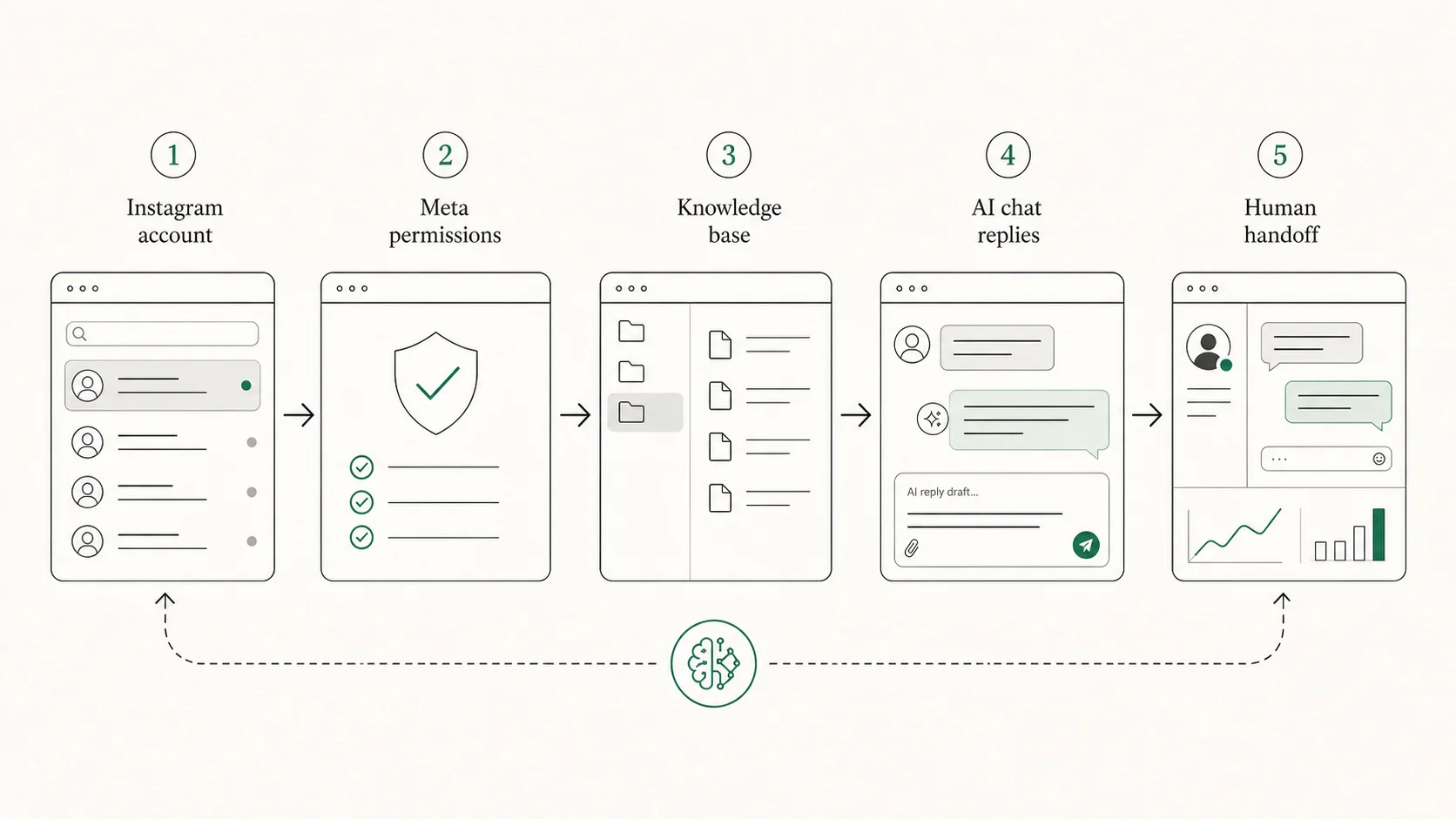
The safe workflow: Instagram account, Meta permissions, YourGPT knowledge base, AI chat replies, and human handoff.
The safe automation rule is to respond to clear intent
Instagram AI automation should be built around user-initiated conversations. If someone sends a DM, replies to a Story, or asks about a product, the AI agent can help respond inside the allowed messaging context. That is very different from unsolicited promotional outreach or profile scraping.
Before launch, turn that principle into operating rules your team can actually follow:
Automate replies to inbound questions and clear customer actions.
Keep promotional content tied to what the user asked.
Do not use the Human Agent window for bot-driven sequences.
Make opt-out and human handoff easy.
Keep sensitive cases out of full automation.
Store only the data you need, and make sure your team understands how conversation data is used.
This is why YourGPT is a better route than unofficial browser bots. A real Instagram AI agent should sit behind approved integrations, not mimic a human in a consumer interface.
How to train the agent so it does not sound generic
A weak Instagram bot says, "Thanks for reaching out! How can I help?" every time. A useful AI agent answers with context.
YourGPT will only sound useful when the knowledge base contains the same judgment your best team member would use. Train it with:
Product facts: names, variants, availability rules, compatibility, use cases, and limitations.
Buying guidance: who each product or plan is for, when to recommend it, and when not to.
Policies: shipping, returns, refunds, warranties, cancellations, and privacy rules.
Brand voice: short replies that sound like your team, not a corporate script.
Lead routing: budget, timeline, need, location, company size, and urgency questions.
Then test the agent with real messages from your Instagram inbox. Do not only test perfect prompts. Test typos, vague messages, angry replies, mixed languages, emoji-only messages, and short questions like "price?", "available?", "link?", and "where?"
Best use cases for Instagram AI agents
Different businesses need different guardrails. The same YourGPT setup can serve ecommerce, creator, agency, and support workflows, but the first automation scope should match the way Instagram already creates value for that business.
Ecommerce brands: answer product questions, suggest the right item, explain shipping and returns, and send people to the correct product page. The agent should ask for size, location, budget, or use case before recommending.
Coaches, consultants, and creators: qualify leads from Stories, Reels, and profile visits. The agent can ask what the person needs help with, share the right resource, and route qualified leads to a booking flow or human closer.
Agencies: create repeatable Instagram automation systems for clients. Standardize the intake checklist: account access, Facebook Page connection, approved knowledge sources, handoff owner, and test scenarios.
Local businesses: answer hours, location, appointment, menu, availability, and basic service questions. Keep urgent or complex cases routed to a person.
Support teams: treat Instagram as part of an omnichannel support layer so DMs do not become a forgotten side inbox while the team works across website chat and other channels.
Launch checklist
Use this checklist before the first real customer conversation reaches the agent. The point is not to make the setup feel complicated. It is to make sure the account connection, agent behavior, and team fallback are all ready before automation is visible to followers.
Account access is clean: the Instagram account is Business or Creator, connected to the correct Facebook Page, and managed by people who should control the integration.
Meta setup is production-ready: app permissions, access tokens, webhook subscriptions, and test message delivery have been checked in the same environment you plan to launch.
YourGPT knowledge is approved: product pages, policies, pricing notes, FAQs, and brand voice examples are current enough for the agent to answer without improvising.
The answer boundary is explicit: the agent has clear rules for topics it can answer, topics where it should ask for more context, and topics it should leave for a human.
Handoff has an owner: every escalation path has a person or team assigned, with expected response times and notification routing already tested.
Real DM patterns have been tested: use actual inbox examples across product questions, lead capture, support, refunds, complaints, short messages, typos, and emoji-heavy replies.
Links and actions work on mobile: product links, booking flows, checkout pages, help articles, and handoff prompts should open cleanly from the Instagram mobile app.
The launch scope is narrow: start with the use cases you trust most, then review transcripts before expanding automation to broader conversations.
The pause plan is obvious: your team should know where to disable AI replies, who can do it, and what to monitor during the first few days.
What to measure after launch
After launch, measure whether the agent is improving conversations, not just whether it is sending more replies. Track practical metrics, not vanity automation counts:
first response time;
percentage of DMs resolved by AI;
percentage handed to humans;
lead capture rate;
booking or checkout clicks;
unanswered conversations;
escalation reasons;
incorrect-answer reports;
customer satisfaction signals where available.
Review transcripts weekly for the first month. Add missing answers to the knowledge base, tighten handoff rules, and remove any replies that sound too robotic. The best Instagram AI agents improve because the team treats them like a live support workflow, not a set-and-forget widget.
FAQ
These are the questions teams usually ask before they let an AI agent answer Instagram DMs in production.
Can I add ChatGPT directly to Instagram? ChatGPT is a general assistant, so it cannot be directly added to Instagram as a customer-facing DM agent. To automate Instagram conversations, use a customer-facing AI agent platform like YourGPT that can connect through Meta-supported messaging, use your business knowledge, manage conversation context, and hand off to a human when needed.
Do I need an Instagram Business account? Use an Instagram Professional account, typically Business or Creator. Personal-account automation is not the right foundation for a production AI agent.
Is Instagram DM automation allowed? It should use official Meta-supported messaging infrastructure and respect messaging policies. Avoid unofficial bots, scraping, cold outreach, or automated replies outside the allowed context.
Can the AI agent reply to comments? Some setups can support comment-to-DM workflows depending on API features and platform support. Treat these carefully so the reply clearly matches the user's action and stays useful.
Can YourGPT handle Instagram and website chat together? Yes. YourGPT positions its AI agents for channels such as Instagram, WhatsApp, websites, and other social channels, which helps teams use one trained agent across multiple touchpoints.
What should I automate first? Start with repetitive, low-risk DMs: pricing, product fit, shipping, returns, appointment links, lead qualification, and basic support. Hand off complaints, refunds, private account questions, and high-value sales conversations.
Get the Instagram AI agent launch checklist: map intents, train on your docs, and set human handoff before going live. Get the checklist →