AI Helpdesk Automation: Routing, Answers and Ticket Actions
How AI helpdesk automation works at the ticket level: triggers, triage, macros, knowledge answers, tool actions, authenticated access to customer records, escalation to humans, and avoiding duplicate writes on failed calls.
A helpdesk automation rollout usually starts with a vendor promise: the AI will resolve most tickets on its own. Getting there has less to do with the model and more to do with what happens to each ticket, step by step. When a request comes in, something must route it, classify it, answer it, sometimes act on it, and decide when a person should take over. This guide walks through that sequence, the decisions at each stage, and the failure cases that separate a working setup from a brittle one.
TL;DR: AI helpdesk automation is a pipeline: trigger, triage, macro, knowledge answer, tool action, and human escalation. Rules handle deterministic routing and canned replies; agents handle varied wording and connected actions. Define which tickets are eligible, authenticate any request that touches a customer's records, verify actions against the system of record, and let the reopen rate tell you what is broken. Choose tooling by workflow fit, not price alone.
The pipeline: what happens to a ticket
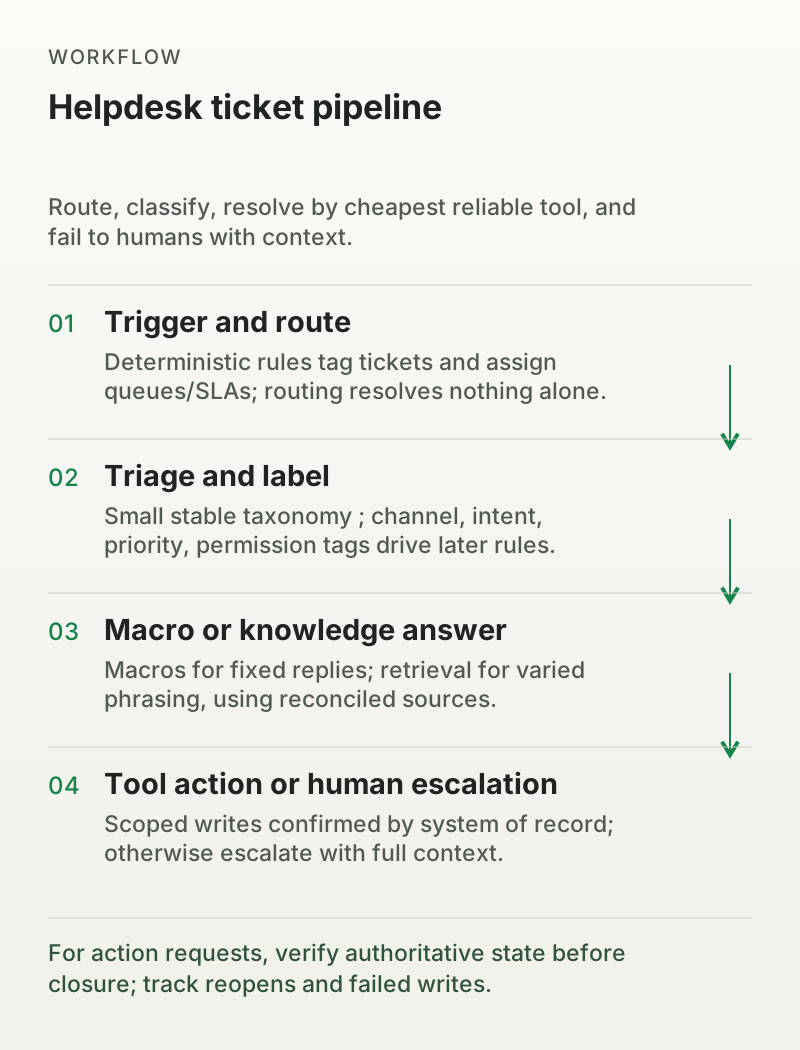
Every ticket passes through the same stages in the same order. It is first identified, then understood, then handled by the cheapest reliable tool that can complete it. Fixed replies become macros. Varied wording goes to knowledge retrieval. Requests that change business data go to an action. Anything that fails these becomes a human ticket with context attached. If you build this sequence before switching on automation, the choices at each step become transparent.
Triggers and routing
Rules are deterministic conditions: if the subject line contains "order," assign the ticket to the order group and start an SLA. Most helpdesks build these natively. Zendesk calls them triggers and automations, Freshdesk calls them automations and ticket dispatch, and Gorgias calls them rules. A typical trigger reads like this: if the channel is email and the subject matches "order", tag the ticket order-status, assign it to the tier-1 group, and set the SLA to high priority. Each condition produces a concrete consequence, so the rule is auditable and easy to change.
Routing directs a ticket to the right queue, but it does not resolve anything. The distinction matters: a perfectly routed ticket can still sit unresolved, and an automated reply can be sent to the wrong group if routing fired before triage. Keep routing narrow and let later stages decide what the ticket actually needs.
Triage and labels
Labels and categories power routing, permissions, and reporting. The ticket should be tagged before it is answered so metrics stay clean. Skill-based routing sends tickets to groups by competence, which matters when a request needs an expert rather than a generalist. For example, a refund over a threshold should be labeled finance-review even if the answer itself is routine, because the permission to approve that amount lives with finance.
A useful label taxonomy is small and stable: a channel tag, an intent tag, a priority tag, and a permission tag. If you invent a new tag every week, your reports and your routing rules both break. Treat labels as a contract between automation and humans: the same label that triggers a rule also filters the queue the human sees, so an agent only ever sees tickets they are authorized to touch.
Macros and canned replies
A macro is a stored reply with variables. It closes tickets that have exactly one correct answer: a reset link, a tracking number, or a policy quote. A macro is not AI; it is a template. A common macro uses placeholders such as {{customer.first_name}} and {{order.tracking_url}}, pulling live data at send time so the reply is personalized without any model involved.
A macro is the right tool when the wording never varies and no action is required. If a customer writes "Where is my order?" and the order number is already in the ticket, a macro can answer immediately. The moment the phrasing varies, the order number is missing, or the customer asks a follow-up, the macro is not enough. Spending a metered AI resolution on a fixed reply converts a free operation into a paid one, so check whether your rules can send the macro directly before you route it to an agent.
Knowledge answers
When customers phrase the same question differently, retrieval pulls an answer from the knowledge base. This is where grounding matters: the answer must come from approved sources, not from the model's general training. Quality depends on source consistency. If one page says a 30-day return window and another says 45, no retrieval method can produce a reliable answer. Conflicting sources should be reconciled before the agent goes live.
Retrieval fails in predictable ways. A question that mixes two intents, such as "Can I return this and get a refund?", needs the agent to split the request before answering. A question that depends on a specific order, such as "Has my package shipped?", cannot be answered from a static policy page; it requires a live data lookup. If the knowledge base cannot support the question, the agent should say so and escalate rather than improvise.
Tool actions
Actions write to another system: create a ticket, issue a refund, update a CRM record, or book a meeting. This is the part where automation becomes risky, because a write can fail, duplicate, or exceed the agent's authority. Actions should have explicit permissions and a defined success check. If the system of record does not confirm the write, the ticket is not resolved. This principle is documented for AI agents that connect to business systems: the action must return a successful result, and attempted execution does not qualify as completed execution.
Two details often get missed. First, an HTTP 200 or a timeout is not proof that a business action completed. Read the resulting state or the authoritative record, because asynchronous jobs can remain pending or failed. Second, if you integrate with a platform's API, follow its current authentication model. For Shopify, for example, new custom apps can no longer be created in the Shopify admin since January 1, 2026; you build them in the Dev Dashboard or with the Shopify CLI and install them on the store. Keep credentials server-side and grant the narrowest access scope the task requires.
For action requests, verify authoritative state before closure; track reopens and failed writes.
Rules versus agent ownership
Rules are deterministic and auditable. Agents decide. This is the core operational split. A rule says: if the tag is "refund" and the amount exceeds the threshold, assign the ticket to finance. An agent interprets "I want my money back" and chooses a path. Rules never improvise; agents do. That makes agents more flexible and harder to audit.
Ownership raises the next question: who closes the ticket, and on what evidence? A rule can close a ticket after sending a macro. An agent should close only when the requested outcome is complete. If the request was informational, an accurate answer may suffice. If it was operational, the action must have succeeded and been confirmed by the system responsible for it. A conversation that ends without that confirmation is not a resolution.
This distinction has commercial consequences. Many platforms meter AI work separately. Zendesk bills AI agents per automated resolution, defined as a request successfully resolved without escalation to a human agent (pricing). Intercom's Fin charges per outcome at $0.99, with qualification outcomes at $9.99, and a 50-outcome monthly minimum when you bring your own helpdesk (Fin pricing). Freshdesk includes the first 500 Freddy AI sessions on paid plans and charges $49 for each additional 100 sessions (Freshdesk pricing). Gorgias bills a helpdesk ticket fee for any ticket with a message sent from the helpdesk, and adds an automation fee when AI or another automation feature such as Flows or Order Management resolves the ticket without human handover; legacy accounts billed before May 28, 2025 follow different terms, so confirm which model applies and request a current quote for the plan you are evaluating (Gorgias billing). Know the unit before you measure success.
How a ticket reaches a human
Escalation is not a failure; it is part of the design. An agent should hand over when it lacks confidence, detects frustration, encounters a topic marked as human-only, hits a policy exception, or reaches an approval threshold. Each of those conditions should be explicit. If the only trigger is "the agent gives up," you will discover edge cases after customers do.
Permissions decide what automation can touch. Grant the least privilege needed. A read-only order lookup does not change state; a full refund action does. A platform may document that an agent can perform order actions, but that documentation does not mean every widget should receive administrative API authority. Scope each action to a specific role and test the failure cases.
SLAs anchor the human queue. The SLA clock runs from ticket creation, and automation should respect business hours and priority. Escalation rules should alert before a breach is imminent. When a ticket reaches a person, it should carry the full context: what the customer asked, what the agent tried, and why it stopped. The human should not have to repeat the investigation.
Identity and authorization for customer-specific requests
The biggest boundary in helpdesk automation is not AI capability; it is access to customer data. An email address, order number, account ID, or phone number is a lookup key, not proof of identity. Matching a typed email to a customer record does not authorize anyone to see that customer's orders or account. Customer-specific records and actions require an authenticated session or a server-validated identity flow, followed by object-level authorization on every request. Never collect passwords, admin tokens, or one-time codes in chat. Use a secure login or verification screen for that, or send a secure link to the stored contact address so the customer verifies themselves outside the conversation.
A worked sequence: order-status email
Consider a common request set. A customer emails "Where is my order?" The pipeline runs as follows:
The email arrives. A rule tags it order-status and assigns it to the tier-1 group. An SLA starts.
The agent extracts an order number from the message. An order number identifies which order is in question; it does not prove the sender owns it.
For tracking details, the agent confirms the customer through an authenticated account session or a secure verification link. Once authenticated, it calls the order API. If the lookup succeeds, it sends the tracking link, asks whether anything else is needed, and closes the ticket when the customer confirms.
If the order number is missing, the agent asks for it. On a valid reply, the lookup proceeds. If the customer cannot provide it, the agent escalates with the partial context.
If the API fails or times out, the agent does not retry blindly. It checks the state first (below) and escalates if the outcome is ambiguous.
Each step has an explicit outcome. Nothing depends on the model improvising a policy. A helpdesk automation project that never tests a missing order ID has not started.
Failed API calls: avoid duplicate writes
Refund requests are the classic case. The agent calls the billing API and the request times out. Did it process? Unknown. A blind retry risks issuing two refunds. The standard pattern is idempotent: the same request key is reused, so a second attempt is recognized as a duplicate and does not write again. Where no idempotency key exists, the agent should check the order's current state before retrying. If the refund already appears as pending, retrying is unnecessary.
The conversation state must not become the source of truth. The system of record confirms the outcome. If the action succeeded and the agent reports its status accurately, the request may be resolvable. If the outcome is unknown, the ticket stays open and goes to a human with a note that the write was attempted but unconfirmed. Vendor guidance for Shopify-style agents is explicit: retrying an action must not create duplicate refunds or duplicate return requests (YourGPT guide).
Reopened tickets and true resolution
The reopen rate is the best early signal. If customers come back with the same issue, either the answer was wrong (a knowledge problem) or the promised action did not happen (a tool problem). Measure reopen rate per article and per action. Fix the cause, not the counter. A ticket that closes and returns is not resolved.
Also separate containment from resolution. Containment means the conversation stayed with automation. Resolution means the customer got the expected outcome. A session that ends because the customer gave up is contained but not resolved. Track both and keep them distinct. Most vendor dashboards report one of these; read the definition before comparing.
What to automate first
Start with high-frequency intents that need no writes and have stable, well-sourced answers: shipping status, policy questions, and tracking information. These are good candidates because the answer is verifiable and the failure mode is visible. Add write actions only after you have scoped permissions and tested failure handling. If your queue is almost all fixed replies, macros alone may cover most of it. An agent earns its cost when wording varies or actions are needed. Compare pricing models side by side, because per-seat, per-outcome, per-ticket, and per-session billing reward different workloads. What matters is matching the meter to the work you actually offload.
Limits of this guide
This article covers the ticket lifecycle. Broader questions, such as staffing ratios, cost modeling, and multi-channel orchestration, belong in a fuller service automation review. Vendor-reported resolution rates are not standardized. Check how each vendor defines a resolution before trusting a dashboard number, and test a small sample of tickets against your own criteria.
FAQ
What is the difference between a helpdesk rule and an AI agent? A rule executes fixed conditions, such as routing a ticket by keyword. An agent interprets natural language and chooses actions. Rules are predictable and auditable; agents handle varied phrasing but need scoped permissions and a verification step.
How do I ensure tickets still reach humans when AI cannot handle them? Set explicit escalation triggers: low confidence, detected frustration, human-only topics, policy exceptions, and approval thresholds. Escalate with full context and keep SLA alerts active so a handoff does not go unnoticed.
What happens if a refund API call times out? Do not blindly retry. Use an idempotency key or check the order state to see whether the write already occurred. If the outcome is ambiguous, keep the ticket open and escalate with a note that the action was attempted but unconfirmed.
Is matching a customer's email address enough to show their order details? No. An email or order number is a lookup key, not proof of identity. Use an authenticated customer session or a secure verification link sent to the stored contact address, then apply object-level authorization before returning any order-specific data.
Is a contained conversation the same as a resolution? No. Containment means no human touched the ticket. Resolution means the customer received the expected outcome. Track both separately, because a customer can leave without getting help.
Why do vendors report different resolution rates? Definitions differ. Some count answered queries, others count completed actions with no follow-up, and others count sessions that stayed with automation. Compare definitions before comparing dashboards.
Conclusion
The point of helpdesk automation is not to maximize a percentage. It is to build a pipeline where every ticket has a defined path, a verified completion, and a human fallback. Start with a narrow scope, measure the reopen rate, and expand into actions only when the failure modes are understood. A setup that closes tickets cleanly, authenticates access to customer records, and escalates honestly will outperform one that merely reports a high automation rate.
Next step: Compare helpdesk automation platforms by billing unit, permissions, and integration depth, then shortlist two for a ticket-level pilot. See which meter fits your workload.
Further reading
What to open next
3 next jobs from this page. Named destinations, not a pile of related guides.