AI Agents for SaaS: Plan Limits, Onboarding and Account Actions
Learn how to give your SaaS support agent live subscription entitlements, role checks, and safe account actions, with worked examples for plan limits, cancellation vs. refund, and escalation.
A SaaS support agent fails in a predictable place. It answers a plan question from the marketing page while the billing system says the customer is on a different plan. It describes a refund policy it cannot execute and proposes an amount no one authorized. It treats a member with read-only access as though that member could change the workspace billing.
None of these failures come from a weak model. They come from wiring. In most SaaS deployments, the agent has documentation but not access to the systems that hold the truth: the subscription database, the seat inventory, and the account itself. This guide walks through the decisions that determine whether an agent can handle plan limits, onboarding, and account actions safely: what to connect, what to verify, and what to refuse.
The three layers behind every correct answer
A correct account answer is built from three layers. Knowledge is the layer most teams build first: the help center, plan comparison, and policy pages the agent was trained on. That layer answers what a Pro plan includes in the abstract. Account context is the live state of the specific customer: their plan, seat count, billing cycle, and outstanding invoices. That layer answers what this customer's plan includes. Action permissions define what the agent may actually change: update seats, switch plans, pause or cancel, or request a refund.
Most inaccurate answers happen because the agent has the first layer but not the second. Without account context, the agent cannot distinguish a customer on a legacy plan from one on a current tier, or a workspace at two of five seats from one at five of five. The fix is to connect the agent to the billing API or an integration that exposes subscription entitlements, and to insist the agent retrieve the live record rather than infer it from the conversation.
Start with one intent tied to a data source
Pick a single intent whose answer depends on a field you can query. How many seats does my plan include and can I add more? is ideal. The answer requires the customer's plan code, the included seat count, and current seat usage, all of which live in your billing system.
Worked entitlement question:
Customer (on your Professional plan): "We're at the seat limit. Can I invite two more people?"
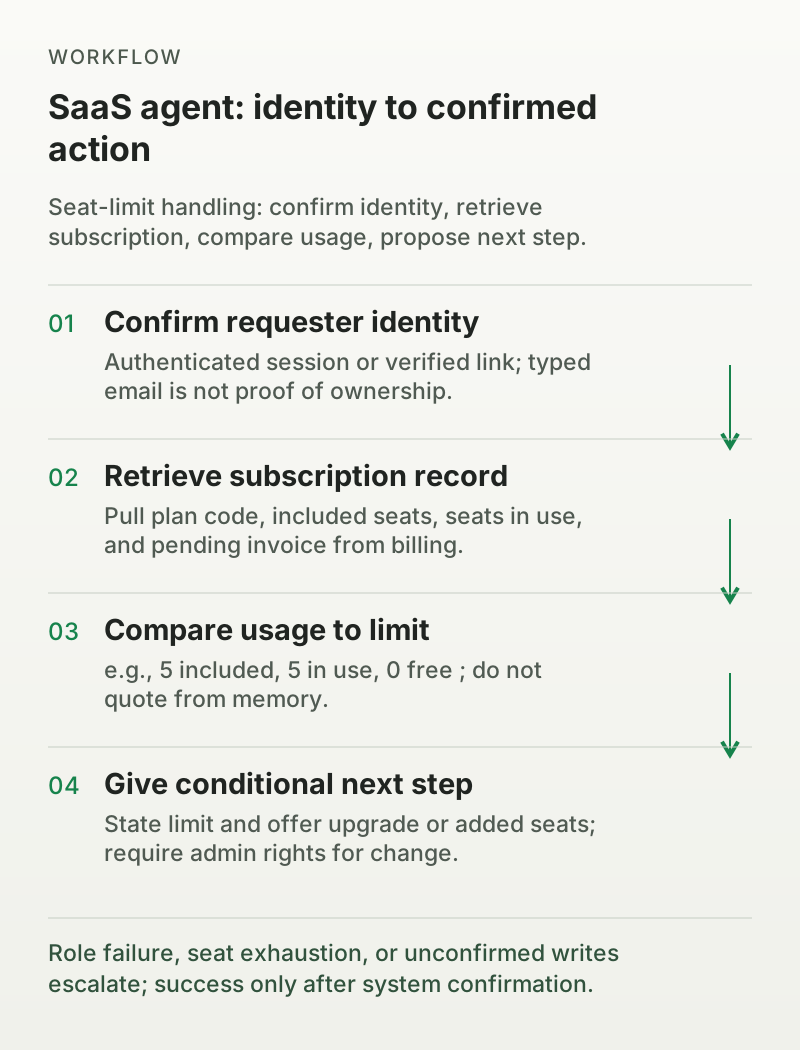
The agent should resolve this in four steps.
Confirm the requester's identity through the authenticated session. If the requester is not signed in, send a secure verification link to the stored contact address before revealing account details or proposing any change. Do not treat a typed email address as proof of ownership.
Retrieve the subscription record: plan code, included seats, seats in use, and any pending invoice.
Compare usage to the limit. In this example: 5 included, 5 in use, 0 free.
Give a conditional answer: "Your Professional plan includes 5 seats, and all 5 are in use. You can add two teammates by upgrading to the 10-seat tier or buying additional seats. I can check the price for your account and start the upgrade if you'd like."
Notice what the agent did not do. It did not quote a price from memory; it offered to look up the account-specific rate. It did not promise an immediate change; it proposed the next step. If the requester lacks admin rights, the agent should say clearly that the workspace owner needs to make the change.
Role failure, seat exhaustion, or unconfirmed writes escalate; success only after system confirmation.
Onboarding account actions: provisioning, not just answering
Onboarding is where account actions meet identity for the first time, and it is the easiest place to get both wrong. A new customer asks the agent to add teammates, set workspace defaults, or confirm what their plan includes during setup. These requests look informational, but they end in provisioning: creating users, assigning roles, and changing workspace state.
The first rule is that the agent must verify the requester's identity and authority before provisioning anything. The admin who signed up can invite members and set roles. A regular member cannot. If the agent cannot confirm the role through the verified session, it should explain who has permission rather than attempt the action.
Worked onboarding question:
New workspace admin: "We just signed up for the Professional plan. I want to invite our two co-founders and set them as admins too."
The agent should resolve this in five steps.
Confirm the requester is authenticated and holds the workspace owner or admin role in the verified session.
Retrieve the subscription record and check the seat allowance. In this example: 5 seats included, 1 in use, 4 free.
Check the invite list for pending invitations so the agent does not double-send.
Send the invitations with the requested admin role, then confirm with the identity system that both invitations were created.
Report the result: "I've invited both co-founders as admins. They'll each get an email to join. You're using 3 of your 5 included seats."
Provisioning errors are a separate failure class. If the invite API returns an error, the agent should not tell the customer the invitations were sent. It should report the failure, include the error details in a ticket, and let a human investigate. A common failure is seat exhaustion: the customer asks to invite more people than the plan allows. The agent should surface the limit and offer the upgrade path rather than attempting the invites and failing partway through.
Also decide what the agent will not provision. Password resets and email changes are identity actions with security implications; route them to a human or a dedicated verification flow. Role changes above the agent's configured authority should be offered as a next step the admin can complete, not executed by the agent.
Verify the workspace, not just the person
Account actions require two checks: who is asking, and what role they hold. A typed email address or order number is a lookup key, not identity proof. Anyone can type a customer's email into a chat window. Matching that string to a record tells you which record the customer claims, not that they own it.
Customer-specific records and account changes require an authenticated session or a server-validated identity flow, followed by object-level authorization on every request. If your product has a login or verification screen, route credential handling there. Never collect passwords, admin tokens, or one-time codes inside the chat. For a guest who cannot sign in but needs information tied to their account, send a secure link to the email address on file; let them complete verification outside the chat and return with a validated session. Do not expose account details in the chat until that session exists.
Workspace roles and billing roles differ from support seats. An agent that can read a customer's profile may still be unauthorized to change their plan. Define which roles may change seats, modify plans, cancel, or request refunds. If the role check fails, route to a human or tell the customer who has the authority.
Keep sources versioned
Pricing and policy pages drift. The plan comparison page may say unlimited storage while the current terms cap it. An older FAQ may describe a 45-day return window that policy changed to 30. Because agents retrieve whatever the knowledge base contains, a stale source becomes a confidently wrong answer.
Version each policy and pricing source. Record when it was published and when it became current. Deprecate superseded pages instead of deleting them silently, so audit trails stay intact. When a platform offers conflict detection, surfacing contradictory training sources for human review, use it as part of publishing, not as a novelty. Assign an owner to every money-related article: someone who reviews changes quarterly and after any pricing change. Before deploying the agent, test the three most common phrasing variants of the entitlement question and confirm the answer reflects the current plan table.
Account-context retrieval is not the same as answering
A general answer, our plans include up to ten seats, is knowledge. An account answer, your workspace currently uses five of ten seats, is retrieval. SaaS agents fail when they confuse the two. The fix is an authenticated connection to the subscription or CRM system, with the customer's identifier passed explicitly.
Do not let the agent answer account questions from conversation alone. If the customer says they are on the Pro plan, the agent should verify against the record. If the customer asks about an invoice, the agent should pull the invoice from the billing system rather than describe how invoicing normally works. Every account-specific claim should trace back to a fetched value, not a training example.
Cancellation and refund are two intents
Customers often ask for both at once: Cancel my account and give me my money back. Treat them as separate intents with different rules.
Cancellation stops future billing. It is often safe for an agent to perform if the customer is authenticated, authorized, and no exception applies. Verify what cancellation means in your product: effective immediately or at end of billing cycle, whether data is retained for a grace period, and whether the customer loses access right away. Then execute and confirm the result with the billing system.
Refund returns money already paid. It almost always requires human judgment: the refund amount, the payment method, the eligibility window, and the impact on the account. Set a threshold. Below it, an agent may process a standard refund if policy allows. Above it, the agent collects the order or invoice reference, records the reason, and hands the case to a person. Do not let the agent propose an amount unless the policy defines the amount for that exact scenario.
A combined request should be sequenced: confirm the refund decision first, or hand both to a human if either exceeds the agent's authority. Never cancel and then leave a refund dangling without a clear owner.
A failed action is data, not a dead end
Actions fail. APIs return errors, subscriptions have pending balances, and roles change mid-conversation. The quality of the agent is defined by how it handles failure.
Worked failed action:
Customer requests cancellation. The agent calls the billing API. The response is 422: "Subscription cannot be canceled with outstanding invoices."
Correct handling:
The agent does not claim success. It reads the error and understands its meaning.
It retries once only if the operation is idempotent and the error looks transient. A 422 caused by an unpaid invoice is not transient, so no retry.
It reports accurately: "I couldn't cancel yet because your account has an outstanding balance. A specialist will contact you to resolve it."
It creates a ticket with the context: requester role, subscription ID, error code, and the step where it stopped.
The same discipline applies to successful-looking responses. A 200 or 202 means the request was accepted, not that the change happened. Read the operation state or the authoritative record to confirm completion. On a timeout, inspect the operation before retrying, and use an idempotency key or duplicate check so a retry does not create two subscriptions, two refunds, or two invitations.
The distinction that matters: attempted execution is not completed execution. Only the billing system's confirmation counts as success. If a dashboard marks the conversation resolved merely because the customer stopped replying, the record lies. Audit resolution counts against confirmed action outcomes.
Escalate to engineering with a repro
Some failures belong to the product, not the customer. A billing API that returns 500 for all cancellation attempts, a UI bug the customer reports, or a feature behaving unexpectedly are engineering problems. The agent's job is to escalate them cleanly.
Send the ticket with a structured reproduction: what the customer tried, the account type, the environment, the exact error, and the timestamp. Do not let the agent speculate about root causes or promise fixes. Escalation to engineering should be a distinct, well-defined path, not an accidental fallback for every uncertainty. Define the trigger: systemic errors, product bugs, security concerns, or anything outside the agent's configured scope.
Measure before you expand
Run a two-week record for the first intent. Count three things:
Replies a human edited. High edit rates mean the underlying article or policy is wrong.
Events the vendor billed. This tells you the true cost per resolved conversation under your pricing model.
Conversations the customer reopened. Reopens reveal resolutions that did not stick.
If edits dominate, fix the source and rerun the same intent. If reopenings dominate, the answer may be technically correct but incomplete; check that the agent addresses the underlying task, not just the literal question. Expand to a second intent only when the first has a named owner who can turn it off and a record that holds across two weeks.
The central finding is that reliable SaaS automation depends less on which model or vendor you choose and more on how you wire the agent to your systems. Knowledge alone produces confident marketing-page answers; account context produces answers that match the customer's real state; identity checks open the right records to the right people; role checks keep actions inside the requester's authority; versioned sources prevent stale limits from becoming policy.
Start with a single intent you can query against a live data source; the seat limit question is the natural first choice. Connect the entitlement lookup, write the identity and role checks, version the plan page, and run the two-week record. Only when edits stay low, billed events match expectations, and reopenings do not recur should you add the next intent. The agent you deploy is only as safe as the data it is allowed to fetch and the actions it is allowed to confirm.
FAQ
01Should an AI agent be allowed to change plans or add seats?
Only after it confirms the requester's identity through an authenticated session, verifies their role, and retrieves the current subscription. If the requester is a workspace owner or admin and the change is within policy, the agent can proceed with system confirmation. Otherwise it should hand off or explain who has the authority.
02What's the difference between cancellation and refund for an agent?
Cancellation stops future billing and is often safe to automate, with confirmation from the billing system. A refund returns money already paid and usually requires human approval or a defined policy threshold. A customer may ask for both; sequence them and never leave a refund without an owner.
03Why does my agent answer plan questions incorrectly?
Usually because it is reading marketing copy or a static plan page instead of the customer's live subscription record. Connect the agent to billing entitlements, pass the verified account identifier, and version your pricing sources so the agent cannot serve a stale limit.
04How should the agent handle a failed API action?
Report the exact status, never claim success, and treat a 200, 202, or timeout as acceptance, not completion. Inspect the operation state before retrying, retry once only if the error is transient and the operation is idempotent, then create a ticket with full context. The billing system's confirmation, not the conversation state, is the only proof of completion.
05When should AI route to engineering?
When the failure is systemic: a repeated API error, a product bug, or a security concern. Send a structured reproduction with the customer's steps, account type, environment, error code, and timestamp. Routing every uncertainty to engineering dilutes the queue; reserve it for genuine product failures.
06When can I expand the agent to a second intent?
After the first intent holds a two-week record: few human edits, expected billing events, and no pattern of reopened conversations. The first intent also needs a named owner who can disable it. Expanding before that baseline hides source and retrieval problems behind volume.